Biweekly Pay Calculator
Enter a salary, an hourly rate or a paycheck amount to compare gross pay for weekly, biweekly, semi-monthly and monthly pay periods.
Recent
Your last 10 settings, saved only in this browser. Nothing is uploaded.
How to use the Biweekly Pay Calculator
- Choose the mode that matches the figure you already know: annual salary, hourly rate, or biweekly paycheck.
- Type that amount into the form. To load a typical case, tap one of the presets above the form: 65,000 salary, 24 per hour at 40 hours, or 2,400 per paycheck.
- Check Hours per week. It defaults to 40. You can enter decimal hours such as 37.5, or h:mm such as 37:30, up to 168.
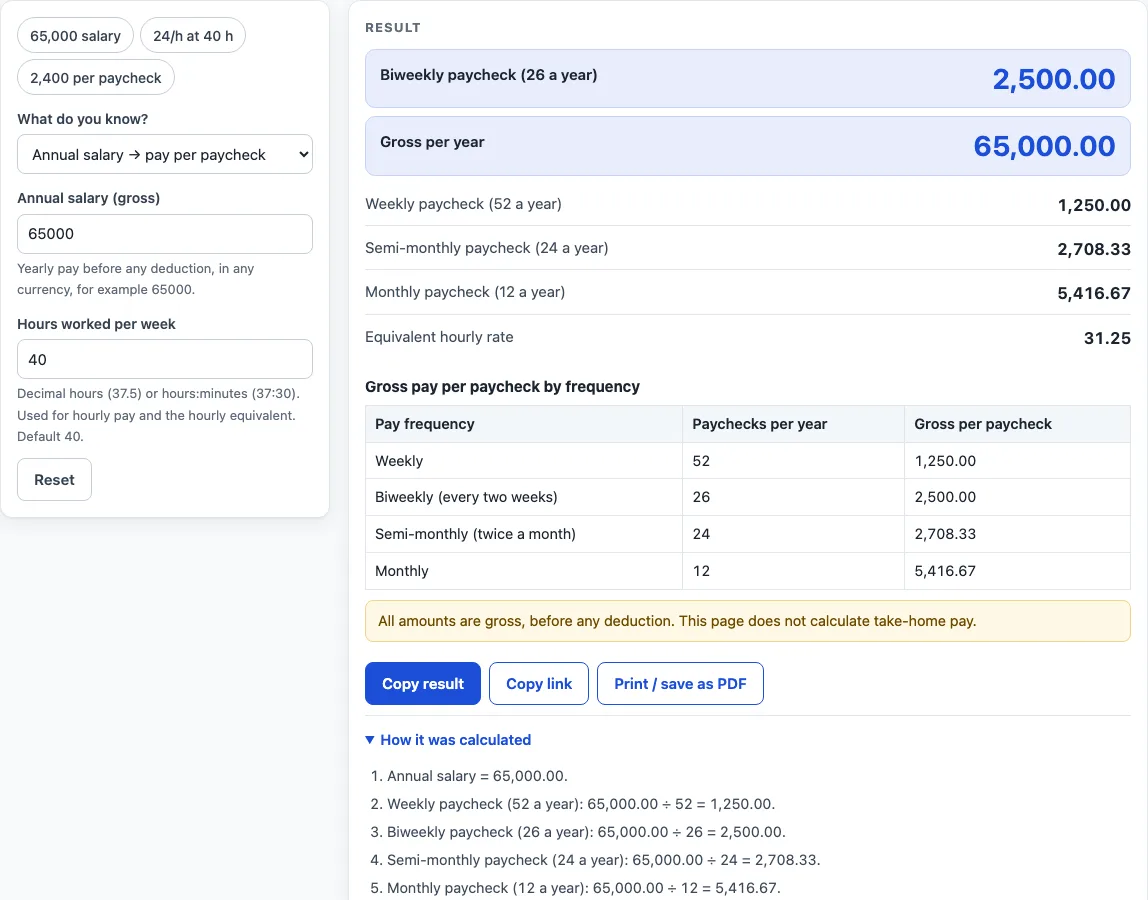
- Read the result. It updates as you type and shows gross pay for weekly, biweekly, semi-monthly and monthly schedules. In salary mode it also shows the equivalent hourly rate.
- Open “How it was calculated” under the result to see the formula with your values, step by step.
- Press Reset to return to the starting example.
Use Copy result to copy the result lines with a link, or Copy link to copy the page address. The address stores every input in the ?s= part of the URL, so the same calculation reopens later or can be sent to someone else. Print / save as PDF creates a one-page record with the inputs, results, calculation steps and the date.
All amounts are gross, before any deduction, and the page does not calculate tax. The table lists each pay frequency with its number of paychecks a year, so you can compare them at a glance.
How do the pay frequencies compare?
Each schedule is a fixed number of paychecks per year: weekly pays 52 times, biweekly 26 times, semi-monthly 24 times and monthly 12 times. Biweekly means every two weeks, which gives 26 paychecks. Semi-monthly means twice a month, which gives 24. The two-paycheck gap is why a typical year contains two months with three biweekly paychecks instead of two.
The calculator uses four formulas:
- Annual salary to paycheck: salary ÷ paychecks per year. For 65,000, that is 65,000 ÷ 26 = 2,500.00 biweekly.
- Hourly rate to annual pay: hourly rate × hours per week × 52. For 24 per hour at 40 hours, that is 24 × 40 × 52 = 49,920.00.
- Biweekly paycheck to annual pay: paycheck × 26. For 2,400.00, that is 62,400.00 a year.
- Salary to equivalent hourly rate: salary ÷ 52 ÷ hours per week. For 65,000 at 40 hours, that is 31.25.
The page uses 52 weeks per year. A calendar year has about 52.14 weeks, so the yearly figure is standard arithmetic, not a day count. In biweekly-paycheck mode, the yearly figure assumes all 26 paychecks are the same amount.
Which of the three modes should I use?
Use annual salary mode when you know a yearly salary and want the amount per paycheck. Use hourly rate mode when you know the rate and your hours per week. Use biweekly paycheck mode when you know one paycheck and want the yearly, weekly, semi-monthly, monthly and hourly equivalents. Hours per week defaults to 40 and accepts decimal hours or h:mm, up to 168.
For 65,000 a year the page shows 1,250.00 weekly, 2,500.00 biweekly, 2,708.33 semi-monthly and 5,416.67 monthly, with an equivalent hourly rate of 31.25 at 40 hours. A table lists each frequency with its paychecks per year. All amounts are gross, before any deduction, and no tax, withholding or take-home pay is calculated.
Worked examples
| Input | Result |
|---|---|
| 65000 a year | 2,500.00 biweekly, 65,000.00 a year |
| 24/h, 40 h per week | 1,920.00 biweekly, 49,920.00 a year |
| 2400 per biweekly paycheck | 2,400.00 biweekly, 62,400.00 a year |
Calculated by the tool above; open it with the same values to see each step.
Frequently asked questions
Does the result show take-home pay?
No. All amounts are gross, before any deduction. The page does not calculate tax, withholding or take-home pay, so use your payslip or payroll system for net figures.
Why does the yearly figure assume all 26 paychecks are the same?
In biweekly-paycheck mode, the yearly figure is the paycheck multiplied by 26. That only holds if every paycheck is the same, which is why a warning appears. If your pay changes from check to check, add up your actual paychecks instead.
Is the biweekly pay calculator free, and is anything I type uploaded?
Yes, it is free and needs no account or sign-up. Everything is calculated in your browser, and nothing you type is uploaded.
Can I print or share a calculation?
Yes. Print / save as PDF creates a one-page record with the inputs, results, calculation steps and the date. Copy link copies a page address that stores every input, so the same calculation can be reopened later or sent to someone else.
Is this tax or payroll advice?
No. Results are plain arithmetic on the numbers you enter, before any deduction. They are not legal, tax or payroll advice, and rules differ by country, state and contract.
Related tools
- Overtime Calculator: split a week’s hours into regular, overtime and double-time pay.
- Time and a Half Calculator: the time-and-a-half rate and the pay for overtime hours.
- Double Time Calculator: pay for one day with regular, overtime and double-time hours.
- Hourly Wage Calculator: gross pay per day, week, month and year from an hourly rate.
- Time Card Calculator: total a week of clock-in and clock-out times, with breaks, rounding, overtime and pay.
- Shift Hours Calculator: end time and paid hours for 8, 10 and 12 hour shifts.
- Salary to Hourly Calculator: turn a salary into an hourly rate.
- Hourly to Salary Calculator: turn an hourly rate into a yearly salary.
- Monthly Salary to Hourly Calculator: turn a monthly salary into an hourly rate.