Biweekly Timesheet Calculator
Fill in 14 days of clock-in, clock-out and break times to see each week's hours, the pay-period total and optional pay with overtime counted per week.
Recent
Your last 10 settings, saved only in this browser. Nothing is uploaded.
How to use the Biweekly Timesheet Calculator
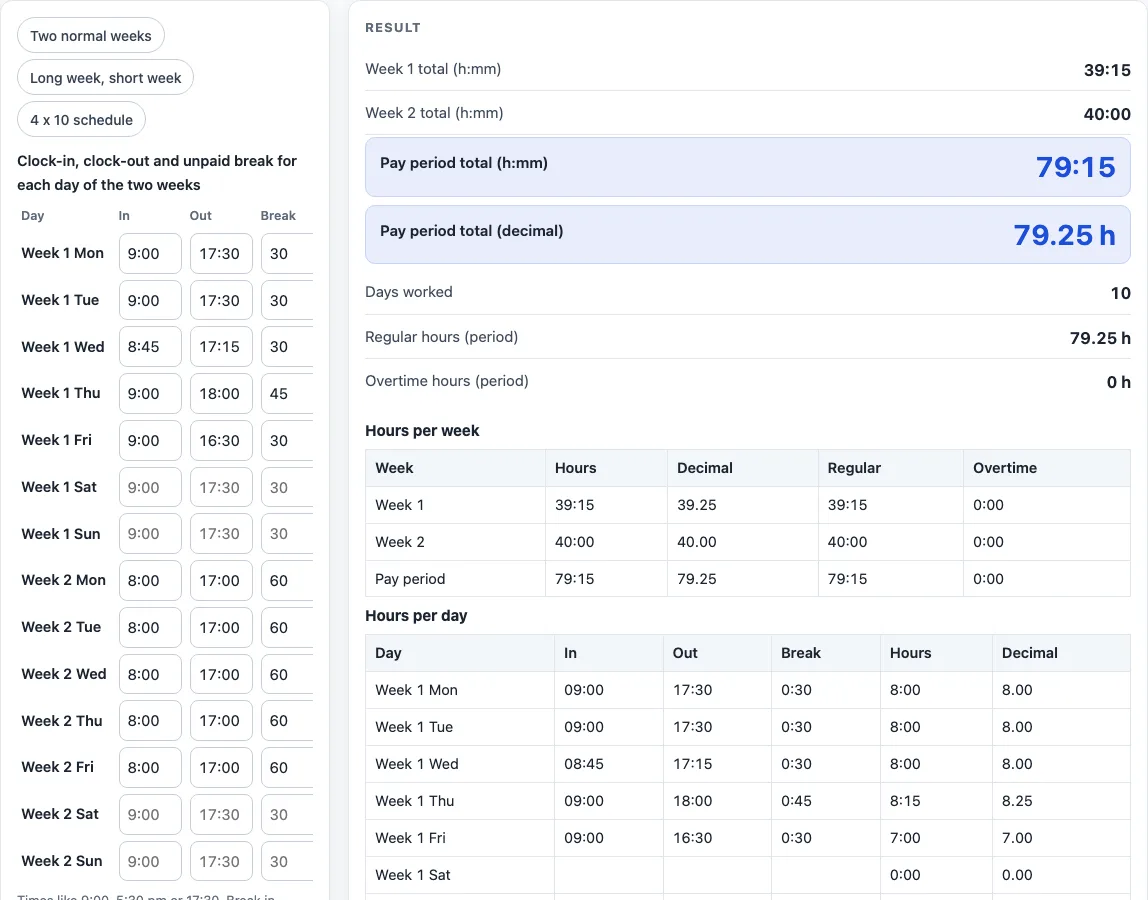
- Look at the 14 rows, labelled Week 1 Mon to Week 2 Sun. To start from a typical case, click a preset above the form: two normal weeks, a long week followed by a short week, or a 4 x 10 schedule.
- For each day you worked, type the start time in the In box and the finish time in the Out box. Times such as 9:00, 5:30 pm or 17:30 all work.
- In the Break box, type the unpaid break in minutes (30) or as h:mm (0:30).
- Leave the whole row empty for a day off. If a row has only an In or only an Out, the error names the day, so fix that row.
- Read the results: the week 1 total, the week 2 total, and the period total shown as h:mm and as decimal hours. The page also shows the number of days worked.
- For overtime, set the weekly threshold (the default is 40 hours; leave it blank for no overtime) and the multiplier (the default is 1.5, and it must be at least 1).
- If you want gross pay, type an hourly rate. The result is shown before any deduction.
- Open “How it was calculated” under the result to see each formula with your own values.
When you are done, use Copy result, Copy link, or Print / save as PDF to keep a record of the calculation. Reset returns the form to the starting example.
How does the biweekly timesheet calculator add up hours?
Each day’s hours equal the out time minus the in time, minus the unpaid break. This is ordinary elapsed-time arithmetic: convert both times to minutes after midnight, subtract the in time from the out time, then subtract the break. For example, 8:00 in, 17:00 out and a 60-minute break gives 9:00 − 1:00 = 8:00.
If the out time is earlier than the in time, the shift is treated as running past midnight. The calculator adds 24 hours before subtracting the break, and shows a warning. Any day longer than 16 hours also gets a warning.
A week total is the sum of its seven days, and the pay period total is week 1 plus week 2. The decimal figure is the minutes divided by 60, so 79:15 becomes 79.25 hours. Days worked counts the rows that have times in them.
How is overtime worked out over two weeks?
Overtime is checked one week at a time. Hours above the weekly threshold are overtime in that week, and weeks are never averaged together. A long week therefore counts as overtime even when the other week is short.
Take a schedule with five 10-hour days in week 1 (50:00) and three 5-hour days in week 2 (15:00). With the 40-hour threshold, week 1 has 10:00 of overtime and week 2 has none, so regular hours are 55:00. At a rate of 21, regular pay is 55 × 21 = 1,155.00, overtime pay is 10 × 21 × 1.5 = 315.00, and gross pay is 1,470.00.
The 40-hour threshold and the 1.5 multiplier follow the formula in U.S. Department of Labor overtime guidance under the Fair Labor Standards Act (29 U.S.C. §207(a), dol.gov/agencies/whd/overtime). They are only starting values, and you can change them to match the rules that apply to you.
Worked examples
| Input | Result |
|---|---|
| 10 day(s), 79.25 h worked | 79:15 (79.25 h) |
| 8 day(s), 65 h worked, rate 21 per hour | 65:00 (65.00 h), gross pay 1,470.00 |
| 8 day(s), 80 h worked | 80:00 (80.00 h) |
Calculated by the tool above; open it with the same values to see each step.
Frequently asked questions
What do the error and warning messages mean?
An error appears when a row has only an In time or only an Out time; the message names the day, and you need to fill in the missing time. A warning appears for a shift longer than 16 hours or a shift that ends after midnight, so check that the times are correct.
What time formats can I type?
You can type times as 9:30, 9.30, 0930, 9:30 pm or 17:30. Without am or pm, the number is read on the 24-hour clock. Breaks can be typed in minutes (30) or as 0:30.
Does the pay period have to be two Monday-to-Sunday weeks?
The grid is laid out as two Monday-to-Sunday weeks, but the pay period is whatever 14 days you enter. If your pay period starts on a different day, enter the 14 days in order.
Is the biweekly timesheet calculator free, and is anything I type uploaded?
Yes, it is free and needs no account or sign-up. Everything is calculated in your browser, and nothing you type is uploaded.
Can I print or share a calculation?
Yes. Print / save as PDF creates a one-page record with the inputs, results, calculation steps and the date. Copy link copies a page address that stores every input, so the same calculation can be reopened later or sent to someone else.
Is this tax or payroll advice?
No. Results are plain arithmetic on the numbers you enter, before any deduction. They are not legal, tax or payroll advice, and rules differ by country, state and contract.
Related tools
- Time Card Calculator: total a week of clock-in and clock-out times, with breaks, rounding, overtime and pay.
- Work Hours Calculator: hours worked in one shift, then per week, month and year.
- Timesheet Calculator: add up any number of shifts pasted one per line.
- Time Clock Calculator: punches before and after lunch for each day of the week.
- Clock Out Time Calculator: find the time you can clock out.
- Weekly Hours Calculator: total the hours you worked on each day of the week.
- Printable Timesheet: print a blank weekly, biweekly, semi-monthly or monthly timesheet.
- Shift Hours Calculator: end time and paid hours for 8, 10 and 12 hour shifts.
- Time Clock Rounding Calculator: round punches to 5, 6, 10, 15, 30 or 60 minutes and see the effect.