Decimal Hours Calculator
Enter a time such as 7:45 to get decimal hours, or enter decimal hours to get hours and minutes.
Recent
Your last 10 settings, saved only in this browser. Nothing is uploaded.
How to use the Decimal Hours Calculator
- Choose a mode. Pick hours and minutes to decimal to convert a time, or decimal hours to hours and minutes to convert a decimal number.
- Type your value. For a time, enter 7:45, 7h 45m, 7 hours 45 minutes, or 7:45:30. A bare number is read as minutes, so 45 gives 0.75 hours. For decimal hours, enter a number such as 6.75 or 8.33.
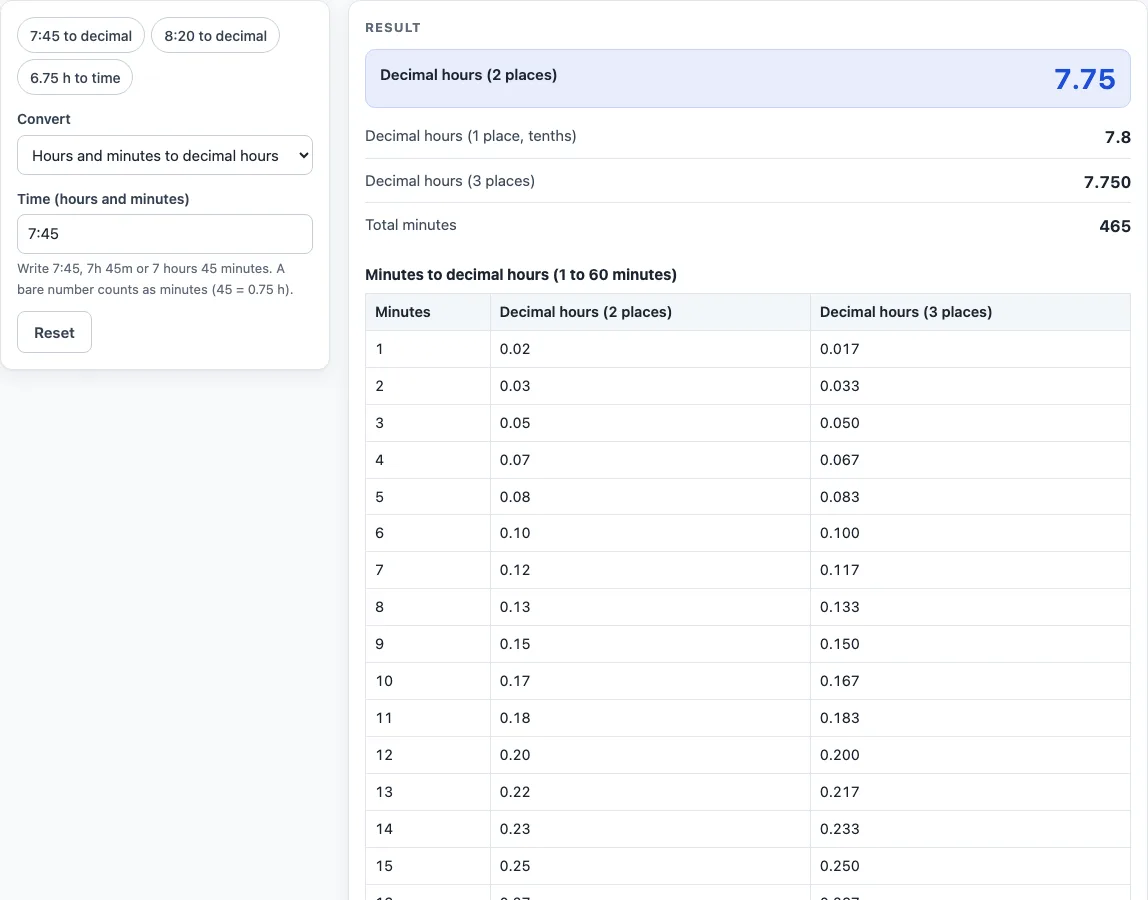
- Read the result as you type. A time to decimal result shows 2 places, 1 place, and 3 places, plus the total minutes. A decimal result shows h:mm and hours, minutes and seconds.
- Check for a warning. If the 2-place figure is not exact, the page tells you how many seconds it is off by.
- Open How it was calculated under the result to see the formula and each step using your numbers.
You can start with a preset button above the form, such as 7:45 to decimal, 8:20 to decimal, or 6.75 h to time. Reset restores the starting example.
To keep your work, use Copy result to copy the result lines with a link, or Copy link to copy the page address, which stores your inputs. For a paper or PDF record, use Print / save as PDF.
The 60-row chart under the result is always shown, in both modes, so you can look up any single minute without typing it.
How do you convert hours and minutes to decimal hours?
Convert the whole time to minutes, then divide by 60. The rule is decimal hours = total minutes / 60, because 1 hour equals 60 minutes.
For 7:45, multiply 7 by 60 to get 420, then add 45 to get 465 minutes. Dividing 465 by 60 gives 7.75 hours. Rounded to 1 place, that is 7.8, and to 3 places it is 7.750. For 7h 5m, the total is 425 minutes, which gives 7.0833 hours and 7.08 at 2 places.
How do you convert decimal hours back to hours and minutes?
Multiply the decimal hours by 60 to get minutes. The rule is minutes = decimal hours x 60. The whole-number part of the minutes gives the hours.
For 6.75, the calculation is 6.75 x 60 = 405 minutes, which is 6:45. For 8.33, the calculation is 8.33 x 60 = 499.8 minutes, which is 8 hours, 19 minutes and 48 seconds. Rounded to the nearest minute, that shows as 8:20.
Why does 8:20 not equal exactly 8.33 hours?
It does not, because 8:20 is exactly 8.3333… hours, and a 2-place figure has to stop somewhere. The rounded value 8.33 is 0.0033 hours short, which is 12 seconds. The page shows this warning whenever the 2-place figure differs from the exact value.
How does rounding work?
The calculator rounds half up at the number of places you choose. For example, 7.75 rounded to 1 place becomes 7.8, because the digit after the rounding point is 5 or more.
Whether a timecard uses 2 places, tenths or quarter hours is set by your employer’s policy. The calculator shows all three precisions and does not decide which one applies to you.
How do I read the minutes-to-decimal chart?
The chart under the result lists every whole minute from 1 to 60 with its decimal hours. A few values come up all the time on timecards: 6 minutes is 0.10 hours, 12 minutes is 0.20, 15 minutes is 0.25, 30 minutes is 0.50 and 45 minutes is 0.75. Minutes that do not divide evenly, such as 20 (0.3333…), are rounded, so the table shows 2 and 3 places. To convert a time such as 7:45, take the hours as they are and look up the minutes: 7 plus 0.75 is 7.75.
Worked examples
| Input | Result |
|---|---|
| 7:45 | 7.75 h |
| 8:20 | 8.33 h |
| 7h 5m | 7.08 h |
| 6.75 decimal hours | 6:45 (6 h 45 min 0 s) |
| 8.33 decimal hours | 8:20 (8 h 19 min 48 s) |
Calculated by the tool above; open it with the same values to see each step.
Frequently asked questions
What is the formula for a decimal hours calculator?
Decimal hours equal total minutes divided by 60. To go the other way, multiply decimal hours by 60 to get minutes.
How do I convert 7:45 to a time calculator in decimals?
Enter 7:45 in the hours and minutes mode. The result is 7.75 hours at 2 places, 7.8 at 1 place and 7.750 at 3 places, with 465 total minutes.
Can I type a time in different formats?
Yes. You can enter 9:30, 9.30, 0930, 9:30 pm, or 17:30. Without am or pm, the number is read on the 24-hour clock.
What does a conversion table show?
The table lists every minute from 1 to 60 with its decimal hours at 2 places and at 3 places. For example, 20 minutes is 0.33 and 0.333, and 45 minutes is 0.75 and 0.750.
Can I enter negative numbers?
No. Negative values are rejected, so enter times and decimal hours as zero or greater.
Does the calculator work for payroll decimal hours?
It converts times and decimal hours using plain arithmetic, which is what many payroll decimal hours calculations need. Check the rounding your employer uses, and check your own records before you rely on the result for pay.
What happens with a break?
Type the break in minutes, such as 30, or as 0:30, and subtract it from your total time before converting.
Is the decimal hours calculator free, and is anything I type uploaded?
Yes, it is free and needs no account or sign-up. Everything is calculated in your browser, and nothing you type is uploaded.
Related tools
- Hours Calculator: add and subtract hours and minutes, one entry per line.
- Time Duration Calculator: the time between two times or two dates.
- Minutes to Hours Converter: convert minutes to hours and hours to minutes.
- Hours to Days Converter: convert hours to days and days to hours.
- Military Time Converter: convert between 12-hour and 24-hour time.
- Work Hours in a Month Calculator: working days and work hours for any month or year.
- Time Card Calculator: total a week of clock-in and clock-out times, with breaks, rounding, overtime and pay.