Hourly Wage Calculator
Enter your hourly rate and your hours per week to see what you earn before deductions per day, week, month and year.
Recent
Your last 10 settings, saved only in this browser. Nothing is uploaded.
How to use the Hourly Wage Calculator
- Type your hourly rate in the hourly rate field, for example 22.50.
- Enter your hours per week. Use a decimal such as 37.5 or a time such as 37:30. The default is 40.
- Set days worked per week, from 1 to 7. The default is 5.
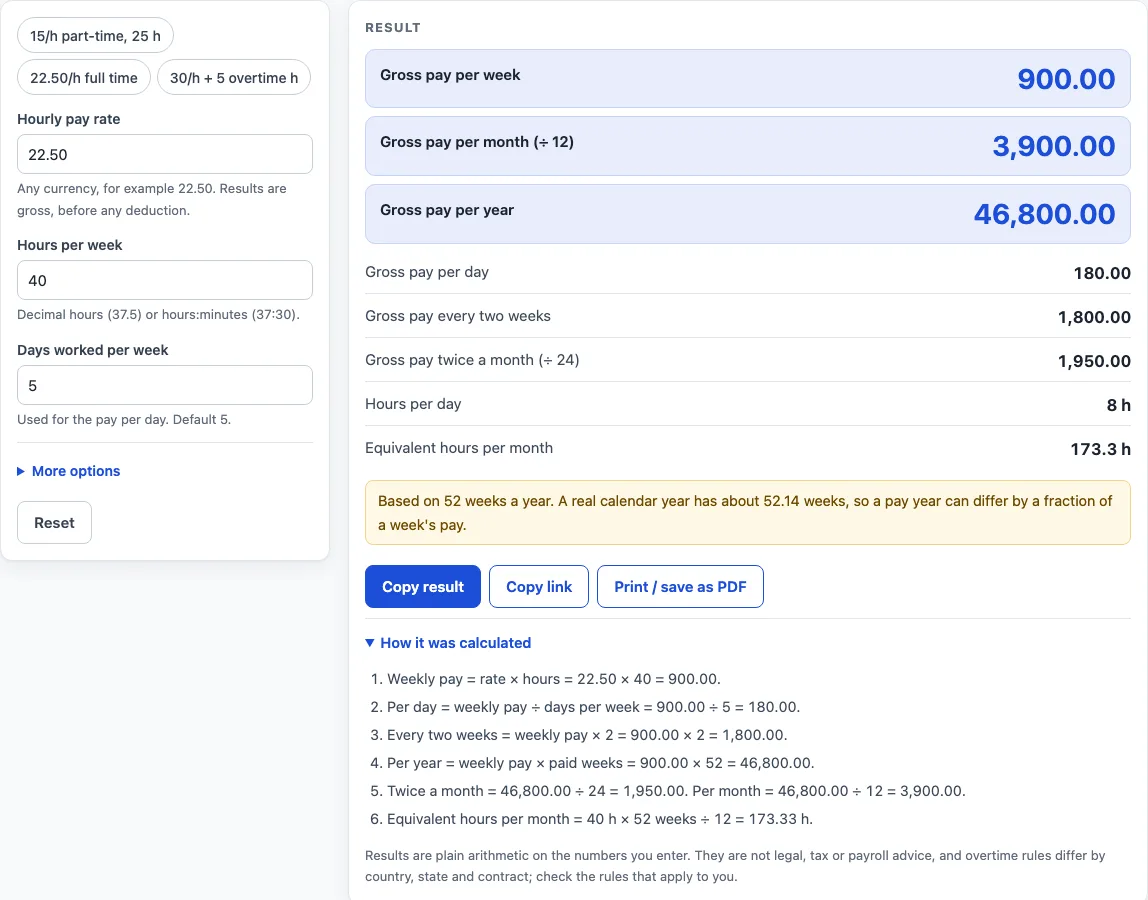
- Read the results. They update as you type and list pay per day, per week, every two weeks, twice a month, per month and per year.
- Open More options to set weeks per year (default 52, maximum 53), unpaid weeks off (default 0), extra overtime hours per week (default 0) and the overtime multiplier (default 1.5).
- Open How it was calculated under the result to see each formula with your own values.
Three preset buttons above the form load typical cases: 15 per hour for 25 hours part-time, 22.50 per hour full time, and 30 per hour with 5 overtime hours. You can change any value after a preset loads. Reset restores the starting example.
Every figure on the page is gross pay, meaning before any deduction. To see a different schedule, change the days worked per week, the weeks per year or the unpaid weeks off, and each result updates. Extra overtime hours are optional and are added on top of your regular hours at the multiplier you set.
How is weekly pay worked out from an hourly rate?
Weekly pay is the hourly rate times the hours per week, plus any overtime pay. The formula is weekly pay = rate × hours + rate × multiplier × overtime hours. For example, 15 per hour for 25 hours gives 15 × 25 = 375.00 per week.
How do overtime hours change the total?
Overtime hours are extra hours on top of the hours per week, paid at the rate multiplied by the multiplier. The default multiplier of 1.5 follows the overtime formula named by the U.S. Department of Labor under the Fair Labor Standards Act, which sets at least 1.5 times the regular rate for hours over 40 in a workweek for covered, non-exempt employees (https://www.dol.gov/agencies/whd/overtime). You can change the multiplier to any number of 1 or more. For example, 30 per hour for 40 hours plus 5 overtime hours gives 1,200.00 + (30 × 1.5 × 5 = 225.00), or 1,425.00 per week.
Why does a year use 52 weeks, and what do unpaid weeks change?
The default of 52 weeks is a convention. 52 weeks × 7 days = 364 days, while 365 ÷ 7 = 52.14 weeks, so you can type 52.14 in the weeks-per-year field for a closer figure. Yearly pay = weekly pay × (weeks per year − unpaid weeks off). At 900.00 per week with 2 unpaid weeks, the year is 900 × (52 − 2) = 45,000.00.
How are the day, two-week, monthly and hour figures found?
Each period comes from the weekly or yearly figure. Per day = weekly pay ÷ days per week. Every two weeks = weekly pay × 2. Twice a month = yearly pay ÷ 24, and per month = yearly pay ÷ 12. Hours per day = (hours + overtime hours) ÷ days, and equivalent monthly hours = (hours + overtime hours) × paid weeks ÷ 12. In the 15 per hour, 25 hour example, the results are 75.00 per day, 19,500.00 per year, 1,625.00 per month and about 108.33 hours per month.
Worked examples
| Input | Result |
|---|---|
| 22.50/h, 40 h per week | gross 900.00 per week, 46,800.00 per year |
| 15/h, 25 h per week | gross 375.00 per week, 19,500.00 per year |
| 30/h, 40 h per week + 5 overtime h | gross 1,425.00 per week, 74,100.00 per year |
| 22.50/h, 40 h per week | gross 900.00 per week, 45,000.00 per year |
Calculated by the tool above; open it with the same values to see each step.
Frequently asked questions
Can I enter hours as minutes or as h:mm?
Hours per week accepts a decimal or an h:mm time, such as 37.5 or 37:30. Use whichever form matches your timesheet.
What do the presets load?
The three preset buttons load 15 per hour for 25 hours part-time, 22.50 per hour full time, and 30 per hour with 5 overtime hours. You can edit any value once a preset has loaded.
How do I enter overtime if my rules are different?
Type your regular hours in hours per week and only the extra hours in extra overtime hours per week. Then set the multiplier to the rate your rules give. Overtime hours are added on top of the regular hours, so do not include them twice.
What does the warning about more than 80 hours mean?
The page shows a warning when hours per week go above 80. The result still calculates, so check that the figure is what you intend.
Why does the page say unpaid weeks have been applied?
When unpaid weeks off are applied, the page shows a note and states how many paid weeks were used. The yearly and monthly figures use that paid-week count rather than the full 52 weeks.
Why are there no currency symbols?
Amounts appear as plain numbers, such as 1,800.00, with no currency symbol. Add the symbol that matches your pay yourself if you need one.
Is the hourly wage calculator free, and is anything I type uploaded?
Yes, it is free and needs no account or sign-up. Everything is calculated in your browser, and nothing you type is uploaded.
Is this tax or payroll advice?
No. Results are plain arithmetic on the numbers you enter, before any deduction. They are not legal, tax or payroll advice, and rules differ by country, state and contract.
Related tools
- Overtime Calculator: split a week’s hours into regular, overtime and double-time pay.
- Time and a Half Calculator: the time-and-a-half rate and the pay for overtime hours.
- Double Time Calculator: pay for one day with regular, overtime and double-time hours.
- Biweekly Pay Calculator: compare gross pay per paycheck for weekly, biweekly, semi-monthly and monthly pay.
- Time Card Calculator: total a week of clock-in and clock-out times, with breaks, rounding, overtime and pay.
- Shift Hours Calculator: end time and paid hours for 8, 10 and 12 hour shifts.
- Salary to Hourly Calculator: turn a salary into an hourly rate.
- Hourly to Salary Calculator: turn an hourly rate into a yearly salary.
- Monthly Salary to Hourly Calculator: turn a monthly salary into an hourly rate.