Hours Calculator
Type one amount of time per line, such as 2:30, 1h 45m or - 0:20, and get the total in hours and minutes, decimal hours and minutes.
Recent
Your last 10 settings, saved only in this browser. Nothing is uploaded.
How to use the Hours Calculator
- Click the text box and type one amount per line. You can enter up to 200 lines. Blank lines are ignored.
- Write each amount as h:mm (2:30), h:mm:ss (1:00:30), a number with a unit (1h 45m, 2 hrs, 90 min, 1.5h, 30s) or a bare number.
- Remember that a bare number is read as minutes, so 90 means 90 minutes. For hours, write 1.5h or 1:30.
- To subtract an amount, start its line with a minus sign, for example -0:20. Lines that start with + or with nothing are added.
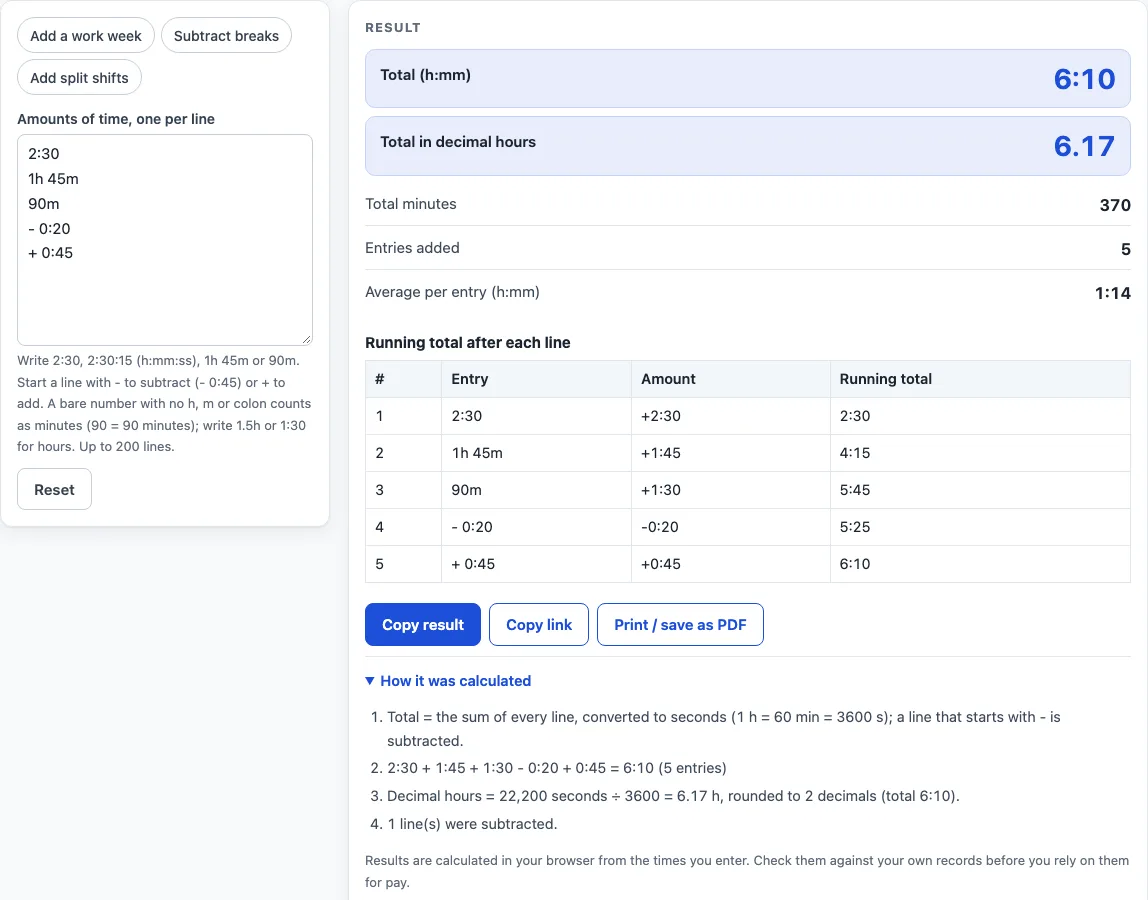
- Read the result. It shows the total as h:mm, in decimal hours, in total minutes and as the average per entry.
- Check the table, which lists each line with the running total after it. Open “How it was calculated” under the result to see the formula with your values.
Preset buttons above the form load three typical cases: Add a work week, Subtract breaks and Add split shifts. Reset returns the form to the starting example.
Blank lines are skipped, so you can leave spaces between groups of entries. A table under the result shows the running total after each line, which makes it easy to find the line where a total goes wrong.
How do I calculate hours worked?
Hours worked are the time between starting and finishing, minus any unpaid breaks. Subtract the break from the length of the shift, not from the clock times themselves. A shift from 9:00 to 17:30 lasts 8:30, and with a 0:30 break the hours worked are 8:00.
How to calculate hours on a timesheet?
A timesheet lists the hours for each day. Work out each day’s hours, enter each figure on its own line, and let the calculator add them. A week of 8:30, 8:15, 7:45, 8:00 and 6:30 totals 39:00, which is 2,340 minutes or 39.00 decimal hours. Once a total reaches 24 hours, the calculator also shows it in days, hours and minutes, so 39:00 appears as 1 d 15 h 0 min.
How to calculate hours on a time card?
A time card records when each shift started and finished, and the hours come from the gap between those two times. Find the length of each shift first, then add the lengths together. A shift that runs past midnight is still measured the same way: 22:00 to 06:00 is 8 hours long. Enter the length of each shift on its own line, and subtract any breaks with a minus sign.
How to calculate minutes for payroll?
Payroll often needs minutes or decimal hours, so convert the total from hours. To get minutes, multiply hours by 60, so 6:10 is 370 minutes. To get decimal hours, divide minutes by 60, so 370 ÷ 60 gives 6.17. The worked example 2:30, 1h 45m, 90m, -0:20 and +0:45 totals 370 minutes, and the calculator shows the same total as 6:10. Decimal hours are rounded to 2 places, so a pay figure calculated from 6.17 can differ slightly from one calculated from exact minutes. Check the rounding rule your employer uses.
How does adding times work?
Adding times means converting every amount to one unit, adding them, and converting the result back. The calculator converts each amount to whole seconds, using 1 hour = 60 minutes = 3,600 seconds, and sums them. No rounding happens during the adding. Only the final h:mm figure is rounded, to the nearest minute. The average per entry is the total divided by the number of lines, so it includes every line you entered.
Worked examples
| Input | Result |
|---|---|
| 5 entries | 6:10 (6.17 h) |
| 5 entries | 39:00 (39.00 h) |
| 4 entries | 8:00 (8.00 h) |
| 4 entries | 11:50 (11.83 h) |
Calculated by the tool above; open it with the same values to see each step.
Frequently asked questions
Why is my total a negative number?
A negative total means you subtracted more time than you added. It is shown with a minus sign, such as -0:30, and a warning appears to tell you so. Check that each line you marked with a minus sign is meant to be subtracted.
Why did I see a warning about minutes?
The warning appears when a line was a bare number, such as 90, which is read as minutes. If you meant hours, write the amount as 1.5h or 1:30 instead.
What happens if a line cannot be read?
The calculation stops and the message names the line number, so you can find and fix it. Minutes and seconds after a colon must be between 0 and 59, so 2:75 will stop the calculation.
Does the table show every line I enter?
The table shows the first 60 lines. If your list is longer, a warning says so, but the totals still include every line up to the 200-line limit.
Do time zones or daylight saving change the result?
No. The calculator adds amounts of time rather than clock times, so time zones and daylight saving do not apply.
Is the hours calculator free, and is anything I type uploaded?
Yes, it is free and needs no account or sign-up. Everything is calculated in your browser, and nothing you type is uploaded.
Can I print or share a calculation?
Yes. Print / save as PDF creates a one-page record with the inputs, results, calculation steps and the date. Copy link copies a page address that stores every input, so the same calculation can be reopened later or sent to someone else.
Related tools
- Time Duration Calculator: the time between two times or two dates.
- Decimal Hours Calculator: convert hours and minutes to decimal hours and back.
- Minutes to Hours Converter: convert minutes to hours and hours to minutes.
- Hours to Days Converter: convert hours to days and days to hours.
- Military Time Converter: convert between 12-hour and 24-hour time.
- Work Hours in a Month Calculator: working days and work hours for any month or year.
- Time Card Calculator: total a week of clock-in and clock-out times, with breaks, rounding, overtime and pay.