Hours to Days Converter
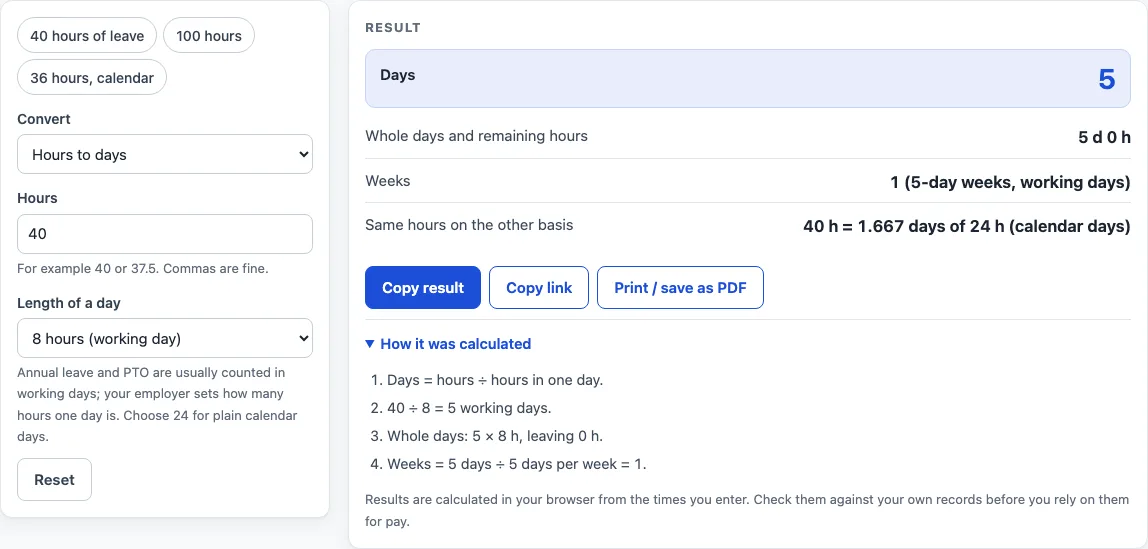
Enter a number of hours and choose the length of a day to see days, whole days with remaining hours, and weeks.
Recent
Your last 10 settings, saved only in this browser. Nothing is uploaded.
How to use the Hours to Days Converter
- Open the Convert select and choose hours to days, or days to hours.
- Type your number in the input box. Commas and decimals such as 37.5 are accepted.
- Under Length of a day, pick 8 hours (working day, the default), 7.5 hours (working day), or 24 hours (calendar day). To use your own length, choose Other length and enter a number greater than 0 and no more than 24.
- Read the result. For hours to days, you see days as a decimal, whole days plus remaining hours, and weeks. For days to hours, you see hours as a decimal, hours with minutes, and weeks.
- Check the second line, which shows the same hours on the other day basis.
- Open How it was calculated under the result to see the formula and your values step by step.
Preset buttons above the form load typical cases, such as 40 hours of leave on an 8-hour day. Reset restores the starting example.
To keep or send your work, use Copy result to copy the result lines with a link, or Copy link to copy the page address. The address stores every input, so the same calculation reopens later or can be sent to someone else. Print / save as PDF creates a one-page record with the inputs, results, steps and date.
The core rule is simple. Days equal hours divided by hours in one day, and hours equal days multiplied by hours in one day. The standard definition is 1 day = 24 hours, so a calendar day uses 24. Working-day lengths of 8 or 7.5 hours are common conventions that you select. They are not a rule that applies everywhere. For example, 100 hours at 8 hours per day is 12.5 days, which the calculator shows as 12 d 4 h.
Weeks follow the same logic. For a 24-hour day, weeks equal days divided by 7. For a shorter working day, weeks equal days divided by 5, which assumes a five-day week. Decimals are rounded to 3 places, with halves rounded up.
The page never says how long a leave day must be. Your employer or contract decides which length applies to you. If you enter a custom day, the calculator warns you to use the length your employer or contract uses. A custom day over 8 hours also gets a warning that it is longer than a usual working day.
Which day length should I pick?
Choose 24 hours for calendar days, 8 or 7.5 hours for a working day, or Other length for a custom number of hours above 0 and up to 24. The calculator does not know how long a leave day is at your workplace, so use the length your employer or contract uses. A second line shows the same hours on the other basis: 40 hours is 5 working days of 8 hours, or 1.667 calendar days; 36 hours is 4.5 working days or 1.5 calendar days.
Can I convert days back to hours?
Yes. Switch the Convert select to days to hours. 3.5 days at 7.5 hours a day is 26.25 hours, which is 26 hours 15 minutes. The result also shows weeks, using 7 days per week for a 24-hour day and 5 days per week for any shorter day.
Worked examples
| Input | Result |
|---|---|
| 40 hours, 8-hour day | 5 days |
| 100 hours, 8-hour day | 12.5 days |
| 36 hours, 24-hour day | 1.5 days |
| 3.5 days, 7.5-hour day | 26.25 h |
| 10 days, 8-hour day | 80 h |
Calculated by the tool above; open it with the same values to see each step.
Frequently asked questions
How do I convert 36 hours to days on a 24-hour day?
Choose the 24-hour (calendar day) option. 36 hours equals 1.5 days, or 1 d 12 h, which is 0.214 weeks on a 7-day week.
Why does the second line show a different number of days?
The second line shows the same hours on the other day basis. A working day of 8 hours shows calendar days of 24 hours, and a 24-hour day shows working days of 8 hours. For example, 40 hours equals 1.667 calendar days, and 36 hours equals 4.5 working days.
How are the weeks in the result calculated?
For a 24-hour day, the calculator divides days by 7. For any shorter working day, it divides days by 5, which assumes a five-day week.
Why does the calculator reject my number?
It shows an error for negative numbers, text, and values above 10,000,000. Enter a positive number, using digits, commas or a decimal point.
Is the hours to days converter free, and is anything I type uploaded?
Yes, it is free and needs no account or sign-up. Everything is calculated in your browser, and nothing you type is uploaded.
Can I print or share a calculation?
Yes. Print / save as PDF creates a one-page record with the inputs, results, calculation steps and the date. Copy link copies a page address that stores every input, so the same calculation can be reopened later or sent to someone else.
Related tools
- Hours Calculator: add and subtract hours and minutes, one entry per line.
- Time Duration Calculator: the time between two times or two dates.
- Decimal Hours Calculator: convert hours and minutes to decimal hours and back.
- Minutes to Hours Converter: convert minutes to hours and hours to minutes.
- Military Time Converter: convert between 12-hour and 24-hour time.
- Work Hours in a Month Calculator: working days and work hours for any month or year.
- Time Card Calculator: total a week of clock-in and clock-out times, with breaks, rounding, overtime and pay.