Military Time Converter
Enter a time to convert it between the 12-hour clock and 24-hour military time, or find the hours between two 24-hour times.
Recent
Your last 10 settings, saved only in this browser. Nothing is uploaded.
How to use the Military Time Converter
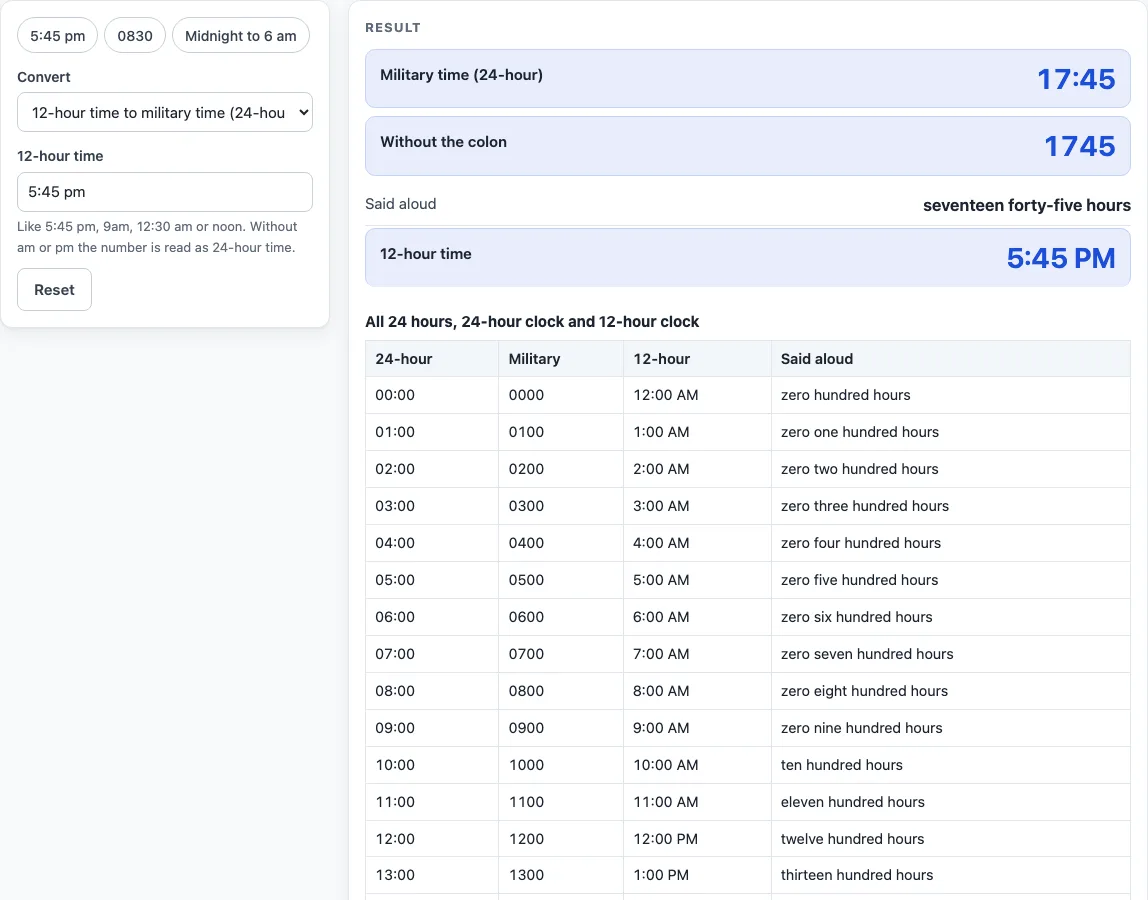
- Choose a mode at the top of the form: 12-hour time to military time, military time to 12-hour time, or hours between two military times.
- In the 12-hour input, type a time such as 5:45 pm, 9am, 12:30 am, noon or midnight. In the military input, type a 24-hour time such as 1745, 17:45, 0830 or 930.
- In hours between mode, type a start time and an end time in 24-hour form. The colon is optional.
- Read the result, which updates as you type. If a warning appears, check your input before you rely on the answer.
- Open “How it was calculated” under the result to see the formula and your values step by step.
- Use Copy result, Copy link or Print / save as PDF if you need to keep the calculation. Details are in the section on printing and sharing below.
Preset buttons above the form load typical cases: 5:45 pm, 0830 and midnight to 6 am. Reset restores the starting example.
The table under the result always lists all 24 hours with the 24-hour time, the compact form, the 12-hour time and the spoken form, so you can look up any full hour without typing. In hours-between mode the end time is taken to be on the next day when it is earlier than the start.
What is the rule for converting 12-hour time to military time?
The rule is that 12 am becomes 00, 1 to 11 am stay the same, 12 pm stays 12, and 1 to 11 pm add 12. The 24-hour clock runs from 00:00 to 23:59, and 24:00 is not used.
For 5:45 pm, add 12 to 5 to get 17, so the time is 17:45, or 1745 in compact form. For 12:30 am, the hour becomes 00, so the time is 00:30, or 0030. The page’s table lists all 24 full hours with 24-hour time, compact form, 12-hour time and the said-aloud form. For example, 00:00 = 0000 = 12:00 AM, and 23:00 = 2300 = 11:00 PM. The notation follows the 24-hour clock style used in ISO 8601 times.
How do you say military time out loud?
Read hours and minutes as numbers. Hours 00 to 09 start with zero, so 0900 is “zero nine hundred hours.” Minutes 01 to 09 are read as “oh,” so 2305 is “twenty-three oh five hours.” A round hour is read as hundred hours, so 1700 is “seventeen hundred hours.”
Other examples: 1745 is “seventeen forty-five hours,” 0830 is “zero eight thirty hours,” 0000 is “zero hundred hours,” and 0005 is “zero zero oh five hours.” This reading follows the common U.S. military convention.
How do you count the hours between two military times?
Use hours between mode with a start time and an end time, both in 24-hour form. The result is the end time minus the start time, shown as h:mm and as decimal hours. If the end is earlier than the start, the end is taken to be on the next day, so 24 hours are added and a warning appears.
For example, 0800 to 1630 is 8:30 hours, which is 8.50 in decimal form, because 30 minutes is half an hour and 8 plus 0.5 is 8.5. Midnight to 6 am (0000 to 0600) is 6:00, and 2200 to 0600 is 8:00. Equal start and end times give 0 hours with a warning. This mode works as a time calculator for military time, so the same steps apply to any pair of times.
What input formats does the converter accept?
You can type times as 9:30, 9.30, 0930, 9:30 pm or 17:30. The 12-hour input accepts forms like 5:45 pm, 9am, 12:30 am, noon and midnight. Four digits with no colon, such as 1745 or 930, are read as 24-hour time.
If you leave out am or pm, the number is read on the 24-hour clock and a warning says so. Entries such as 2400, 25:00 and minutes above 59 are errors.
Worked examples
| Input | Result |
|---|---|
| 5:45 pm | 17:45 (1745) |
| 0830 | 8:30 AM |
| 23:05 | 11:05 PM |
| 0000 to 0600 | 6:00 h |
| 2200 to 0600 | 8:00 h |
Calculated by the tool above; open it with the same values to see each step.
Frequently asked questions
Is military time the same as 24-hour time?
Yes. Military time is the 24-hour clock, where the hours run from 00 to 23. The main difference is in how the time is said aloud, such as “seventeen forty-five hours” for 1745.
How do I convert military time back to 12-hour time?
Switch to the military time to 12-hour time mode and enter the 24-hour time. For example, 1745 becomes 5:45 PM, and 0030 becomes 12:30 AM.
Why does a result show a midnight note?
The page adds the note when a result is midnight. It reminds you that 00:00 is midnight at the start of the day, not the end of it.
Why does 2400 or 25:00 show an error?
The 24-hour clock runs from 00:00 to 23:59, and 24:00 is not used. Hours above 23 and minutes above 59 are also invalid, so 25:00 and 0075 both show an error.
What does the warning about am or pm mean?
It means you typed a number without am or pm, so the tool read it as 24-hour time. Check that the result matches what you meant. For example, 7:30 with no am or pm is read as 07:30, not 19:30.
What is the difference between 1200 and 0000?
1200 is 12:00 PM, which is noon. 0000 is 12:00 AM, which is midnight at the start of the day.
Is the military time converter free, and is anything I type uploaded?
Yes, it is free and needs no account or sign-up. Everything is calculated in your browser, and nothing you type is uploaded.
Can I print or share a calculation?
Yes. Print / save as PDF creates a one-page record with the inputs, results, calculation steps and the date. Copy link copies a page address that stores every input, so the same calculation can be reopened later or sent to someone else.
Related tools
- Hours Calculator: add and subtract hours and minutes, one entry per line.
- Time Duration Calculator: the time between two times or two dates.
- Decimal Hours Calculator: convert hours and minutes to decimal hours and back.
- Minutes to Hours Converter: convert minutes to hours and hours to minutes.
- Hours to Days Converter: convert hours to days and days to hours.
- Work Hours in a Month Calculator: working days and work hours for any month or year.
- Time Card Calculator: total a week of clock-in and clock-out times, with breaks, rounding, overtime and pay.