Monthly Salary to Hourly Calculator
Enter your monthly salary and your hours per week to see the hourly rate, the hours per month used and the daily, weekly and yearly equivalents.
Recent
Your last 10 settings, saved only in this browser. Nothing is uploaded.
How to use the Monthly Salary to Hourly Calculator
- Type your monthly salary. You can enter 50000, 50,000, $5,000 or 5k.
- Set hours per week. The default is 40, and the limit is 168.
- Keep the method on Whole year (the default). It counts hours as hours per week × 52 ÷ 12.
- If you want the rough shortcut, choose 4 weeks per month. The page then shows the standard rate and the percentage difference beside it.
- For the 22-day method, enter hours per day and working days per month. Working days default to 22 and can be set from 1 to 31.
- Set days worked per week if you need to. The default is 5.
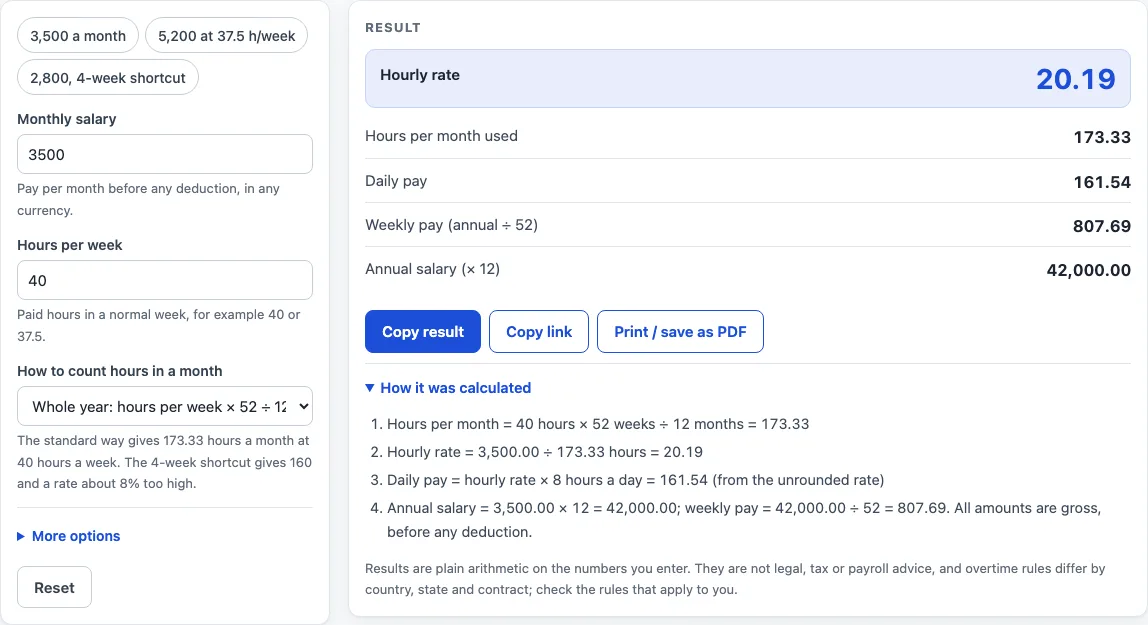
- Read the hourly rate, the hours per month used, daily pay, weekly pay and annual salary. The result updates as you type.
- Open “How it was calculated” under the result to see the formula with your own values.
The preset buttons above the form load three typical cases: 3,500 a month, 5,200 a month at 37.5 hours a week, and 2,800 a month with the 4-week shortcut. Less common inputs sit under More options. Reset restores the starting example.
All figures are gross, before any deduction. The page also shows the daily, weekly and yearly pay that go with the hourly rate, so you can check that the monthly salary you entered adds up.
The calculator uses one rule: hourly rate = monthly salary ÷ hours worked in a month. Most of the work is in the second part, counting the hours. The calculator offers three ways to do that.
Whole year (default). Hours a month = hours per week × 52 ÷ 12. At 40 hours a week this is 173.33 hours, which is the monthly form of the common 2,080-hour year. For a salary of 3,500 a month, 3,500 ÷ 173.33 = 20.19 an hour. The same figures give a daily pay of 161.54, a weekly pay of 807.69 (monthly × 12 ÷ 52) and an annual salary of 42,000.00 (monthly × 12).
4 weeks per month (shortcut). Hours a month = hours per week × 4, which is 160 hours at 40 a week. A month has about 4.33 weeks, so this method counts too few hours and overstates the hourly rate by about 8.33% (13/12). For 2,800 a month, 2,800 ÷ 160 = 17.50 an hour, against 16.15 with the standard method. The page shows both figures and always displays a warning with this method.
22 working days. Hours a month = 22 × hours per day. For 4,400 a month over 22 days of 7.5 hours, 4,400 ÷ 165 = 26.67 an hour. If these monthly hours differ from the standard hours by more than 2%, the page warns you.
Which method should I use?
Use the whole-year method unless your employer states another basis. It spreads the 52 weeks of the year evenly over 12 months, so it matches the common 2,080-hour year. The 22-working-days method suits a fixed schedule of a set number of days a month; type the hours per day and the working days in the month. The 4-weeks-a-month shortcut is only there so you can see how much it differs: the page always shows the whole-year result next to it. All results are gross figures before any deduction, and the page does not calculate tax.
Worked examples
| Input | Result |
|---|---|
| 3500 a month, 40 h/week, Whole year: hours per week × 52 ÷ 12 (standard) | 20.19 an hour (173.33 hours a month) |
| 5200 a month, 37.5 h/week, Whole year: hours per week × 52 ÷ 12 (standard) | 32.00 an hour (162.5 hours a month) |
| 2800 a month, 40 h/week, 4 weeks per month (rough shortcut) | 17.50 an hour (160 hours a month) |
| 4400 a month, 40 h/week, 22 working days × hours per day | 26.67 an hour (165 hours a month) |
Calculated by the tool above; open it with the same values to see each step.
Frequently asked questions
Why does the 4-week shortcut give a higher hourly rate?
The shortcut counts 4 weeks in a month, but a month has about 4.33 weeks. That leaves out about 13 hours at 40 hours a week, so the same salary is divided by fewer hours. The standard whole-year method is usually the closer figure.
What formats can I type the monthly salary in?
You can type 50000, 50,000, $5,000 or 5k. An empty, non-numeric, zero or negative salary shows an error, and so does an hours-per-week value of zero or above 168.
Can I use this calculator for a semi monthly salary?
A semi monthly salary is paid twice a month. To use this calculator, enter the total you receive across one month as the monthly salary. The rate then reflects your full monthly pay.
What if I work a fixed number of days, not a standard week?
Use the 22 working days method. Enter the hours per day and the working days in the month, which can be set from 1 to 31. Hours per day above 24 will show an error.
Is the monthly salary to hourly calculator free, and is anything I type uploaded?
Yes, it is free and needs no account or sign-up. Everything is calculated in your browser, and nothing you type is uploaded.
Can I print or share a calculation?
Yes. Print / save as PDF creates a one-page record with the inputs, results, calculation steps and the date. Copy link copies a page address that stores every input, so the same calculation can be reopened later or sent to someone else.
Is this tax or payroll advice?
No. Results are plain arithmetic on the numbers you enter, before any deduction. They are not legal, tax or payroll advice, and rules differ by country, state and contract.
Related tools
- Salary to Hourly Calculator: turn a salary into an hourly rate.
- Hourly to Salary Calculator: turn an hourly rate into a yearly salary.
- Hourly to Salary Chart: a chart of yearly pay for hourly rates from 10 to 100.
- Salary to Hourly Chart: a chart of hourly pay for yearly salaries from 20,000 to 250,000.
- Hourly Wage Calculator: gross pay per day, week, month and year from an hourly rate.
- Biweekly Pay Calculator: compare gross pay per paycheck for weekly, biweekly, semi-monthly and monthly pay.
- PTO Accrual Calculator: paid time off earned per pay period or per hour worked.