PTO Accrual Calculator
Enter your yearly paid time off, or your accrual rate per hour worked, to see how much you earn each pay period and what your balance will be.
Recent
Your last 10 settings, saved only in this browser. Nothing is uploaded.
The PTO accrual calculator shows how much paid time off you earn each pay period, how fast your balance grows, and what it will be after a set number of pay periods. You can enter a fixed yearly amount in hours or days, or a rate of 1 hour of PTO for every set number of hours worked. It also shows the pay period when a balance cap is reached and how many periods it takes to reach a target balance.
The tool is free and runs in your browser, so nothing you type is uploaded. There is no account or sign-up. Results are plain arithmetic on the policy numbers you enter. This page covers the same projection under other names people search for, including PTO calculator, PTO time calculator, time off accrual calculator and paid time off calculator.
How to use the PTO accrual calculator
Start with a preset if one fits. The buttons above the form load ‘80 h/year, biweekly’, ‘15 days, semi-monthly’ and ‘1 h per 30 worked’. Then follow these steps.
- Choose how your policy works: ‘a fixed amount per year spread over pay periods’ or ‘1 hour of PTO for every N hours worked’.
- In fixed-amount mode, enter the PTO per year and pick hours or days. If you enter days, check ‘hours in one workday’ (default 8).
- In hours-worked mode, set N (default 30), then enter the hours worked per week or per pay period.
- Choose your pay period: weekly, biweekly (the default), semi-monthly or monthly.
- Enter your current PTO balance in hours.
- Enter the hours already used. They are subtracted from the balance to give the starting balance.
- Set the pay periods to project (1 to 520, default 26).
- Open ‘More options’ only if your policy has a balance cap or a target balance.
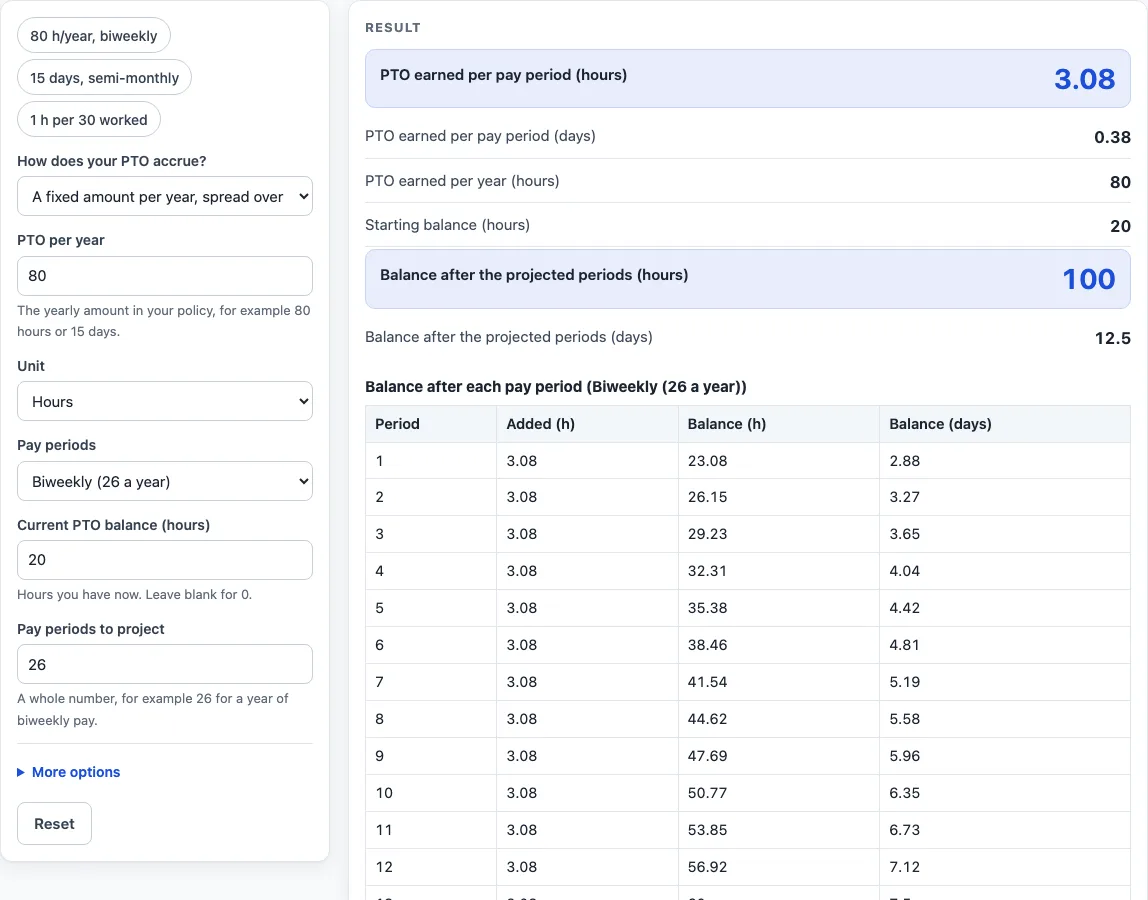
The results update as you type. Check the PTO earned per pay period and per year, the starting balance, the balance after the projected periods, and the periods to reach your target. The table lists the balance after each pay period, up to 26 rows.
‘Copy result’ copies the result lines with a link. ‘Copy link’ copies the page address, which holds every input. ‘Print / save as PDF’ produces a one-page record with the inputs, results, steps and date. ‘Reset’ restores the starting example.
How do you calculate PTO accrual per pay period?
Divide the paid time off you earn in a year by the number of pay periods in the year. The page uses 52 for weekly pay, 26 for biweekly, 24 for semi-monthly and 12 for monthly. For 80 hours a year paid biweekly, 80 ÷ 26 = 3.08 hours per pay period. If your time off is given in days, the calculator multiplies the days by the hours in one workday (8 unless you change it): 15 days at 8 hours is 120 hours, which is 5 hours per pay period when paid semi-monthly.
How does accrual per hour worked work?
Some plans give 1 hour of time off for every N hours worked. Enter N (the default is 30) and your hours per week or per pay period. At 40 hours a week and 1 hour per 30 worked, a biweekly pay period has 80 hours worked, so 80 ÷ 30 = 2.67 hours per pay period, or 69.33 hours a year.
How is the future balance worked out?
The starting balance is your current balance minus the hours you have already used. Each projected pay period adds one period’s accrual, and the table shows the hours added and the balance in hours and days after every period, up to 26 rows. If you set a cap, accrual stops when the balance reaches it and a warning names the pay period where that happens. For example, a 10-hour balance with 80 hours a year paid biweekly and a 30-hour cap reaches the cap in pay period 7. Amounts are shown to two decimals, but the projection uses the unrounded figure.
Your employer’s policy decides rounding, start dates and carry-over. This calculator is plain arithmetic on the numbers you type and does not know your policy.
Worked examples
| Input | Result |
|---|---|
| 80 Hours a year, Biweekly (26 a year) | 3.08 h per period, 100 h after 26 periods |
| 15 Days a year, Semi-monthly (24 a year) | 5 h per period, 120 h after 24 periods |
| 1 hour per 30 hours worked, 40 per week, Biweekly (26 a year) | 2.67 h per period, 44.67 h after 13 periods |
Calculated by the tool above; open it with the same values to see each step.
Frequently asked questions
Does rounding change my PTO balance?
The results show two decimals, but the projection uses the unrounded accrual. Your employer’s policy decides how rounding, start dates and carry-over are handled, so check those rules separately.
What happens when my balance reaches the cap?
Accrual stops once the balance reaches the cap, and a warning names the pay period where that happens. If your balance is already above the cap, nothing is added.
What if my hours used are more than my balance?
A warning appears. Check the current balance and the hours used, because the starting balance is calculated by subtracting one from the other.
Can I find out when I will reach a target balance?
Yes. Enter a target balance under ‘More options’, and the result shows the number of pay periods needed to reach it.
Which pay schedules does the calculator support?
It offers weekly (52 a year), biweekly (26), semi-monthly (24) and monthly (12) pay periods. The default is biweekly.
Will the result match my pay stub?
The result shows what your policy numbers imply, not what your employer records. It is plain arithmetic, not payroll or legal advice, so compare it with your own records.
Is the PTO accrual calculator free, and is anything I type uploaded?
Yes, it is free and needs no account or sign-up. Everything is calculated in your browser, and nothing you type is uploaded.
Can I print or share a calculation?
Yes. Print / save as PDF creates a one-page record with the inputs, results, calculation steps and the date. Copy link copies a page address that stores every input, so the same calculation can be reopened later or sent to someone else.
Related tools
- Salary to Hourly Calculator: turn a salary into an hourly rate.
- Hourly to Salary Calculator: turn an hourly rate into a yearly salary.
- Monthly Salary to Hourly Calculator: turn a monthly salary into an hourly rate.
- Hourly to Salary Chart: a chart of yearly pay for hourly rates from 10 to 100.
- Salary to Hourly Chart: a chart of hourly pay for yearly salaries from 20,000 to 250,000.
- Hourly Wage Calculator: gross pay per day, week, month and year from an hourly rate.
- Biweekly Pay Calculator: compare gross pay per paycheck for weekly, biweekly, semi-monthly and monthly pay.