Salary to Hourly Calculator
Enter your salary and your hours per week to see the hourly rate it works out to, with daily, weekly and monthly equivalents.
Recent
Your last 10 settings, saved only in this browser. Nothing is uploaded.
How to use the Salary to Hourly Calculator
- Type your salary in the salary box. You can enter 50000, 50,000, $50,000 or 50k.
- Choose the pay period: per year, per month, per semi-monthly period (twice a month), per two weeks or per week.
- Set hours per week. The default is 40, and the maximum is 168.
- Check weeks per year. The default is 52, and you can set any value from 1 to 53.
- Enter unpaid weeks off per year if you take time off without pay. The default is 0.
- Set days worked per week. The default is 5.
- Read the hourly rate, which is the main result. The result updates as you type.
- Open “How it was calculated” under the result to see the formula with your own values.
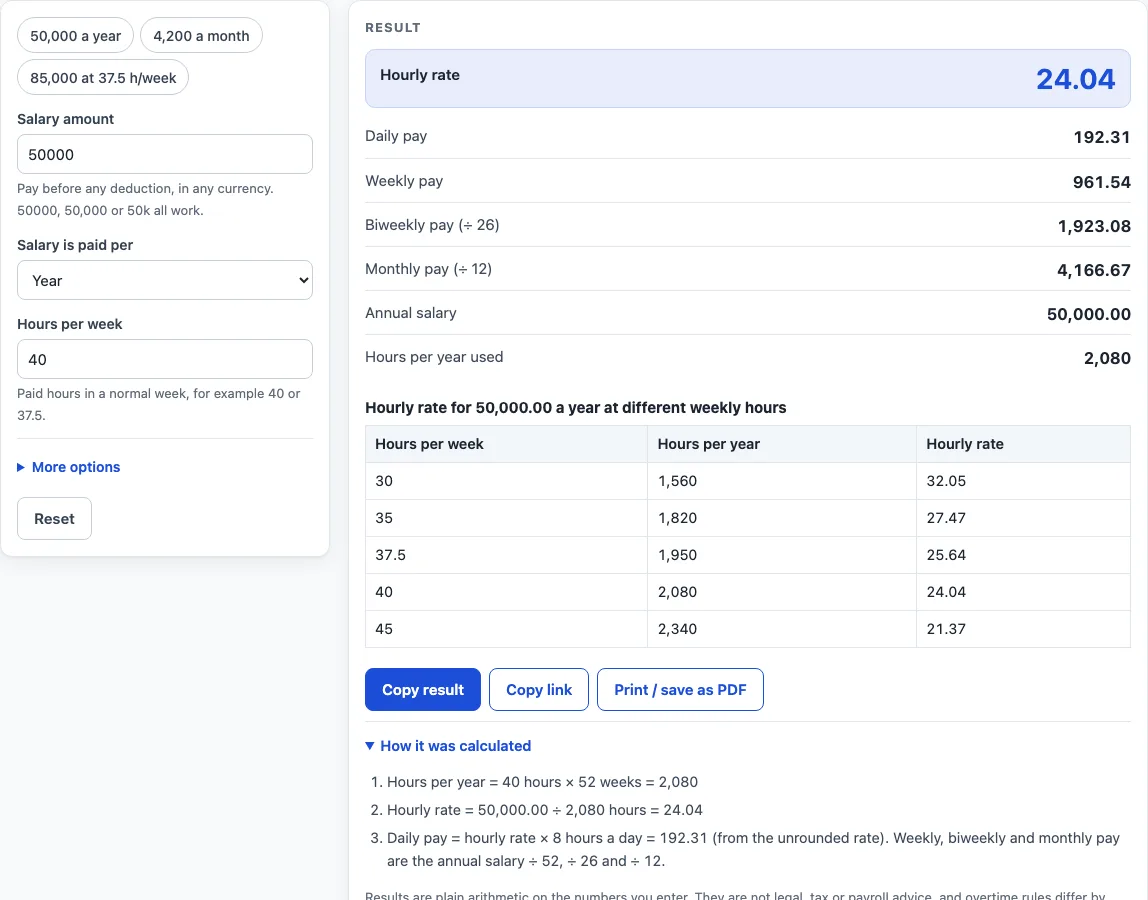
Above the form, the preset buttons load 50,000 a year, 4,200 a month, or 85,000 a year at 37.5 hours a week. Less common inputs, including the optional pay basis, sit under “More options.” “Reset” restores the starting example. Under the result, “Copy result” copies the result lines with a link, “Copy link” copies a page address that stores your inputs, and “Print / save as PDF” prints a one-page record of the inputs, results, steps and date.
All results are gross, before tax or any other deduction, and are shown without a currency symbol, so they work in any currency.
How to work out hourly rate of salary
The hourly rate is the annual salary divided by the paid hours in a year. This is the standard arithmetic definition of an hourly rate: annual pay ÷ annual hours. The calculator writes it as hourly rate = annual salary ÷ paid hours a year. For example, 50,000 a year divided by 2,080 paid hours gives 24.04 an hour.
How to work out hourly pay from a monthly or weekly salary
The hourly rate is always based on a yearly amount, so a salary paid in another period must be converted first. The calculator multiplies by 1 for yearly salaries, 12 for monthly, 24 for semi-monthly, 26 for every two weeks, and 52 for weekly salaries. A monthly salary of 4,200 becomes 4,200 × 12 = 50,400 a year. Then 50,400 ÷ 2,080 = 24.23 an hour.
How do the hours per year change the hourly rate?
The paid hours are the divisor, so they affect the result as much as the salary does. The default year is 40 hours a week × 52 weeks = 2,080 paid hours. In general, hours a year = hours per week × weeks per year. More hours a year means a lower hourly rate for the same salary. For example, 85,000 a year at 37.5 hours a week gives 37.5 × 52 = 1,950 hours, and 85,000 ÷ 1,950 = 43.59 an hour. The table on the page shows the same salary at 30, 35, 37.5, 40 and 45 hours a week.
How do unpaid weeks off change the hourly rate?
Unpaid weeks off are taken out of the year before the division. The formula becomes hours a year = hours per week × (weeks per year − unpaid weeks). For example, a salary of 52,000 with 2 unpaid weeks at 40 hours a week gives 40 × 50 = 2,000 hours. Then 52,000 ÷ 2,000 = 26.00 an hour. If you are paid for every week of the year, leave unpaid weeks at 0.
What is the U.S. federal pay (OPM) basis?
The optional basis “U.S. federal pay (OPM)” uses a fixed 2,087 hours a year instead of the standard 2,080. This follows the divisor described in the U.S. Office of Personnel Management fact sheet “Computing Hourly Rates of Pay Using the 2,087-Hour Divisor.” For example, 60,000 ÷ 2,087 = 28.75 an hour, compared with 60,000 ÷ 2,080 = 28.85 on the standard basis. With this basis, hours per week, weeks per year and unpaid weeks are not used. The page shows a warning if they differ from 40, 52 and 0.
What are the daily, weekly and monthly equivalents?
Divide the annual salary by the paid hours a year to get the hourly rate, then use that rate to check the other figures. Daily pay is the hourly rate × hours per day, where hours per day = hours per week ÷ days per week. For 50,000 a year at 40 hours a week, the results are 24.04 an hour, 192.31 a day, 961.54 a week (50,000 ÷ 52), 1,923.08 every two weeks (50,000 ÷ 26), and 4,166.67 a month (50,000 ÷ 12). Multiplying the rounded hourly rate by 8 gives 192.32, a difference of one cent that comes from rounding the hourly rate.
Worked examples
| Input | Result |
|---|---|
| 50000 per year, 40 h/week, Standard (hours per week × weeks) | 24.04 an hour (50,000.00 a year) |
| 4200 per month, 40 h/week, Standard (hours per week × weeks) | 24.23 an hour (50,400.00 a year) |
| 85000 per year, 37.5 h/week, Standard (hours per week × weeks) | 43.59 an hour (85,000.00 a year) |
| 60000 per year, 40 h/week, U.S. federal pay (OPM): 2,087 hours a year | 28.75 an hour (60,000.00 a year) |
Calculated by the tool above; open it with the same values to see each step.
Frequently asked questions
Can I type a salary like 50k?
Yes. The salary box accepts 50000, 50,000, $50,000 and 50k, where k means thousand.
Why does my hourly rate change when I change the hours per week?
The salary stays the same, but the number of paid hours in the year changes. For example, 85,000 a year gives 40.87 an hour at 40 hours a week (85,000 ÷ 2,080) and 43.59 an hour at 37.5 hours a week (85,000 ÷ 1,950).
Does the calculator include overtime?
No. The inputs are salary, pay period, hours per week, weeks per year, unpaid weeks and days worked per week, and there is no overtime input. The hourly rate is based only on the paid hours you enter.
Why do I see an error message?
Errors appear for an empty or non-numeric salary, a zero or negative number, more than 168 hours a week, unpaid weeks that are not fewer than the weeks per year, and hours per week that would need more than 24 hours a day.
Is the salary to hourly calculator free, and is anything I type uploaded?
Yes, it is free and needs no account or sign-up. Everything is calculated in your browser, and nothing you type is uploaded.
Can I print or share a calculation?
Yes. Print / save as PDF creates a one-page record with the inputs, results, calculation steps and the date. Copy link copies a page address that stores every input, so the same calculation can be reopened later or sent to someone else.
Is this tax or payroll advice?
No. Results are plain arithmetic on the numbers you enter, before any deduction. They are not legal, tax or payroll advice, and rules differ by country, state and contract.
Related tools
- Hourly to Salary Calculator: turn an hourly rate into a yearly salary.
- Monthly Salary to Hourly Calculator: turn a monthly salary into an hourly rate.
- Hourly to Salary Chart: a chart of yearly pay for hourly rates from 10 to 100.
- Salary to Hourly Chart: a chart of hourly pay for yearly salaries from 20,000 to 250,000.
- Hourly Wage Calculator: gross pay per day, week, month and year from an hourly rate.
- Biweekly Pay Calculator: compare gross pay per paycheck for weekly, biweekly, semi-monthly and monthly pay.
- PTO Accrual Calculator: paid time off earned per pay period or per hour worked.