Time and a Half Calculator
Enter your regular hourly rate and your overtime hours to see the time-and-a-half rate and the pay for those hours.
Recent
Your last 10 settings, saved only in this browser. Nothing is uploaded.
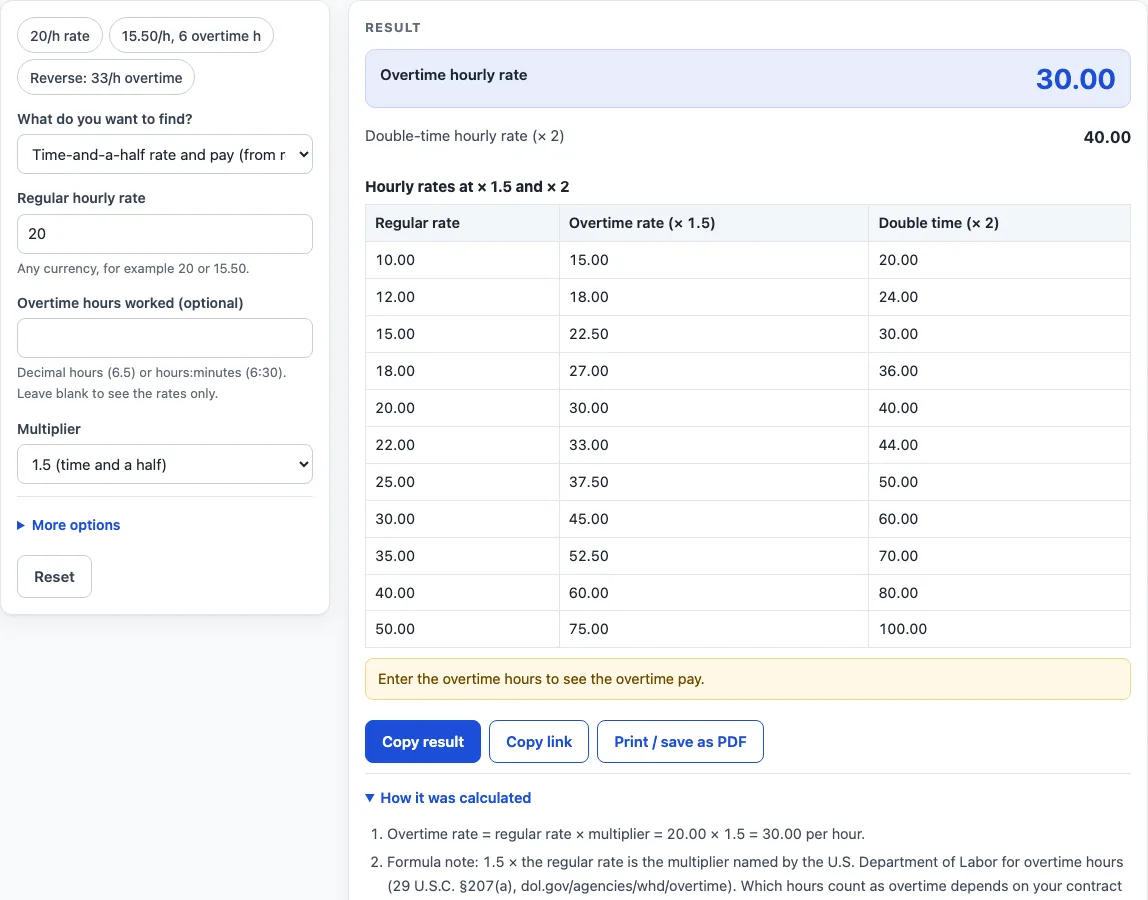
How to use the Time and a Half Calculator
- Choose the mode that starts from the regular hourly rate.
- Type your regular hourly rate, for example 20.
- Type your overtime hours if you have them. You can use a decimal, such as 6.5, or h:mm, such as 6:30. Leave this blank to see rates only.
- Pick a multiplier from the list. 1.5 is the default for time and a half. Choose Custom to reveal a field where you can type any number of 1 or more.
- Open Advanced and enter your regular hours worked if you want regular pay and total gross pay.
- Read the results: the overtime hourly rate, the double-time rate, the overtime pay and, if you entered regular hours, the regular pay and total gross pay.
- Open “How it was calculated” to see each step with your own values.
The presets above the form load typical cases: 20 per hour, 15.50 per hour with 6 overtime hours, and a reverse calculation of 33. Reset restores the starting example. Copy result copies the result lines with a link. Copy link copies the page address, which stores every input, so the same calculation reopens later or can be sent to someone else. Print / save as PDF produces a one-page record with the inputs, results, steps and date.
How to work out time and a half
Time and a half is an hourly rate of 1.5 times your regular rate. You work it out by multiplying the regular rate by 1.5. For a regular rate of 20 per hour, 20 × 1.5 = 30.00 per hour for overtime.
Double time is the regular rate multiplied by 2, so the same 20 per hour gives 40.00 for double time. The calculator shows both figures, so you can compare them.
How to calculate time and a half pay
Overtime pay is the number of overtime hours multiplied by the overtime rate. First find the overtime rate, then multiply it by the hours. At 15.50 per hour, the overtime rate is 15.50 × 1.5 = 23.25. Six overtime hours then give 6 × 23.25 = 139.50.
Each step is plain multiplication, so you can check the figure by hand with a pen and paper.
How do I calculate time and a half when I only know the overtime rate?
Run the calculation backwards by dividing the overtime rate by the multiplier. If your overtime rate is 33 per hour, the regular rate is 33 ÷ 1.5 = 22.00, and double time is 44.00.
Reverse mode prints a check line: regular rate × multiplier = the overtime rate you typed. Multiplying back and dividing are inverse steps, so this line confirms the answer.
How do you calculate time and a half under the law?
The U.S. Department of Labor describes overtime under the Fair Labor Standards Act as at least 1.5 times the regular rate of pay for hours over 40 in a workweek, for covered, non-exempt employees (29 U.S.C. §207(a)). The calculator uses 1.5 as its editable default. It does not decide which of your hours count as overtime.
Other countries, states, employers and contracts use other thresholds and multipliers. Choose Custom and type the multiplier that applies to you.
How do you figure out time and a half from the lookup table?
The lookup table under the results lists regular rates from 10 to 50, with the overtime rate and double-time rate at your chosen multiplier. The values change with the multiplier. At 1.5, a rate of 15 gives 22.50 and 30.00, and at 1.25, a rate of 10 gives 12.50.
Use the table to compare several rates quickly, then check the exact figure in the main result.
How to figure time and half with regular pay included
Enter your regular hours under Advanced to add regular pay and total gross pay to the result. Total gross pay is regular pay plus overtime pay.
Take a regular rate of 18 at 1.25 with 4 overtime hours and 40 regular hours. The overtime rate is 18 × 1.25 = 22.50, and the overtime pay is 4 × 22.50 = 90.00. Regular pay is 40 × 18 = 720.00, so the total is 720.00 + 90.00 = 810.00.
Worked examples
| Input | Result |
|---|---|
| regular rate 20/h | overtime rate 30.00/h |
| regular rate 15.50/h | overtime rate 23.25/h, overtime pay 139.50 |
| overtime rate 33/h | regular rate 22.00/h |
| regular rate 18/h | overtime rate 22.50/h, overtime pay 90.00 |
Calculated by the tool above; open it with the same values to see each step.
Frequently asked questions
What multiplier should I use for time and a half?
Use 1.5, which is the default. For a different rule, pick 1.25, 1.75, 2 or 2.5 from the list, or choose Custom and type any number of 1 or more.
What does the warning about no overtime hours mean?
It means you have entered a regular rate but no overtime hours. The calculator then shows rates only, with no overtime pay. Type your hours to see the pay.
What happens if I use a multiplier of 1 or 2?
A multiplier of 1 gives the regular rate, and a multiplier of 2 gives the double-time rate. The table then shows a column with the same value as another column, and a warning points this out.
Does the result update as I type?
Yes. The results change as you type, and “How it was calculated” under the result shows the formula and your values step by step.
Is the time and a half calculator free, and is anything I type uploaded?
Yes, it is free and needs no account or sign-up. Everything is calculated in your browser, and nothing you type is uploaded.
Can I print or share a calculation?
Yes. Print / save as PDF creates a one-page record with the inputs, results, calculation steps and the date. Copy link copies a page address that stores every input, so the same calculation can be reopened later or sent to someone else.
Is this tax or payroll advice?
No. Results are plain arithmetic on the numbers you enter, before any deduction. They are not legal, tax or payroll advice, and rules differ by country, state and contract.
Related tools
- Overtime Calculator: split a week’s hours into regular, overtime and double-time pay.
- Double Time Calculator: pay for one day with regular, overtime and double-time hours.
- Hourly Wage Calculator: gross pay per day, week, month and year from an hourly rate.
- Biweekly Pay Calculator: compare gross pay per paycheck for weekly, biweekly, semi-monthly and monthly pay.
- Time Card Calculator: total a week of clock-in and clock-out times, with breaks, rounding, overtime and pay.
- Shift Hours Calculator: end time and paid hours for 8, 10 and 12 hour shifts.