Time Duration Calculator
Enter a start and an end time, with dates if the span is longer than a day, to see the duration in days, hours, minutes and decimal hours.
Recent
Your last 10 settings, saved only in this browser. Nothing is uploaded.
The Time Duration Calculator finds the time that passes between a start time and an end time. It shows the result as days, hours and minutes, as h:mm, as decimal hours, and as total minutes and total seconds. It works as a duration of time calculator, an elapsed time calculator and a calculator for time difference in one page.
Leave the dates blank and it treats the times as a single clock span, including overnight shifts. Add a start date and an end date and it also handles spans of several days. You can add an unpaid break to see the net duration.
It runs in your browser, it is free, and there is no account or sign-up. Use it to total a work shift, check an hour to hour span, or measure the gap between two date-times.
How to use the Time Duration Calculator
- Type a start time in the start field, such as 9:00, 9:30 am or 21:15. You can also pick one of the preset buttons above the form.
- Type an end time in the end field in the same way.
- If you have an unpaid break, enter it in minutes (30) or as h:mm (0:30).
- For a span across dates, or one longer than 24 hours, enter a start date and an end date in yyyy-mm-dd format. Fill in both dates or neither.
- Read the result. It shows the duration as days, hours and minutes, as h:mm, as decimal hours, as total minutes and as total seconds. If you entered a break, the net duration after the break appears too.
- Open “How it was calculated” under the result to see the formula and your values, step by step.
The result updates as you type, so you can change a value and watch the answer change. The buttons under the result handle copying and printing. The Reset button restores the starting example.
The date fields are under More options and are only needed when the span reaches past 24 hours. Presets load a 9 to 5 day, an overnight shift and a span across dates.
How is a duration of time calculated?
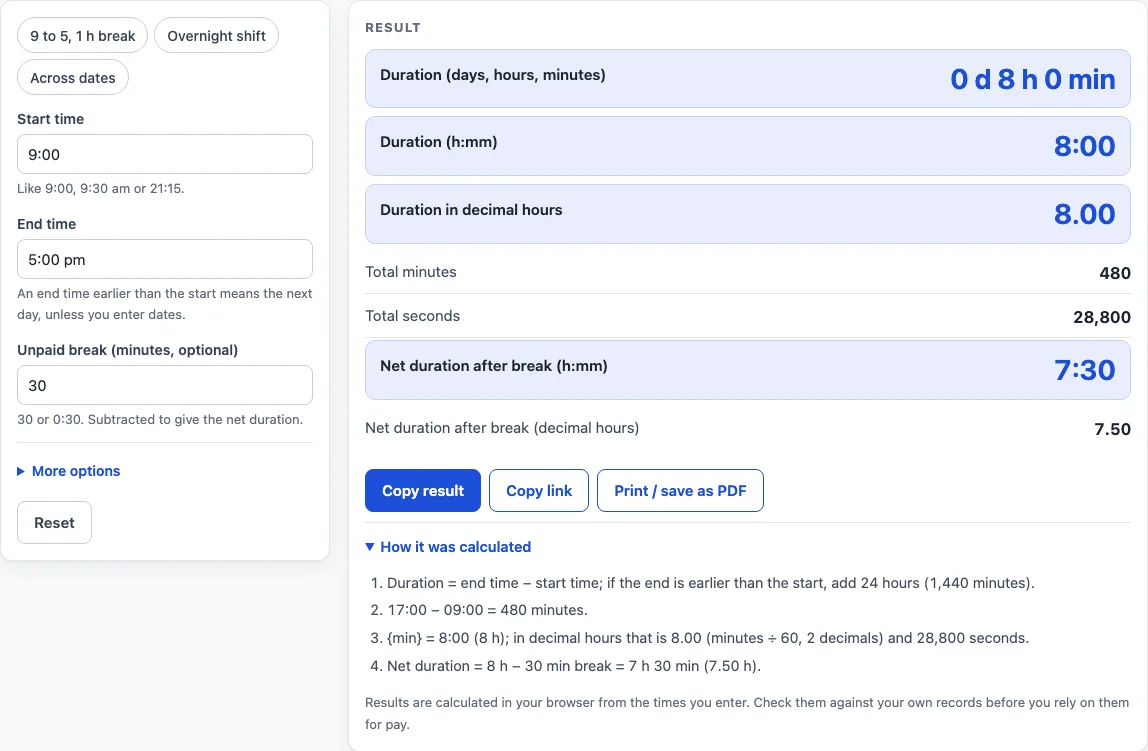
Without dates, the duration is the end time minus the start time on the clock. For example, 9:00 to 5:00 pm gives 8:00. If the end time is earlier than the start time, the span runs into the next day, so the calculator adds 24 hours and shows a warning. That is why 22:00 to 6:00 gives 8:00.
If the start and end times are equal and no dates are entered, the duration is 0. The page then warns you to enter dates for spans of 24 hours or more, because the clock alone cannot show how many full days have passed.
How do dates change a time duration?
With both dates entered, the calculator counts the whole days between them and adds the clock difference. The formula is: days between the dates x 1,440 minutes + (end time - start time). For 2026-03-01 08:30 to 2026-03-04 17:45, there are 3 days (4,320 minutes) plus 9 h 15 min, a total of 4,875 minutes.
Dates must be real calendar dates, and leap years follow the Gregorian rules. So 29 February exists in 2000 and 2024 but not in 2100. Entering only one date is an error. An end that falls before the start, when dates are used, is also an error.
Does a clock change or time zone affect the result?
Not in this calculator. With dates, each date-time is treated as a fixed local time, so daylight-saving changes and time zones are ignored. A span that crosses a clock change can differ by 1 hour from the real elapsed time, and the page warns you about this.
If your span crosses a clock change, compare the result with a clock or your own records before you rely on it.
How does an unpaid break change the result?
An unpaid break is subtracted from the gross duration to give a net duration. The page shows the net as h:mm and as decimal hours, next to the gross figure. For example, 9:00 to 5:00 pm with a 30 minute break is 8:00 gross (480 minutes) and 7:30 net, which is 7.50 decimal hours.
A break longer than the whole duration is an error, because the net time cannot be negative.
What units does the result show?
The duration appears in several forms. Days, hours and minutes look like 3 d 9 h 15 min. h:mm can go past 24, such as 81:15. Decimal hours are rounded half up to 2 places. Total minutes and total seconds are also shown. Decimal hours are the minutes divided by 60.
These conversions use standard definitions: 1 day = 24 hours = 1,440 minutes = 86,400 seconds. So 81:15 equals 81.25 hours, 4,875 minutes and 292,500 seconds.
Worked examples
| Input | Result |
|---|---|
| 9:00 to 5:00 pm | 8:00 (8.00 h) |
| 22:00 to 6:00 | 8:00 (8.00 h) |
| 2026-03-01 8:30 to 2026-03-04 17:45 | 81:15 (81.25 h) |
| 2024-02-28 22:00 to 2024-03-01 6:00 | 32:00 (32.00 h) |
Calculated by the tool above; open it with the same values to see each step.
Frequently asked questions
Can I type times in different formats?
Yes. 9:30, 9.30, 0930, 9:30 pm and 17:30 are all accepted. Without am or pm, the number is read on the 24-hour clock, so 5:30 means 05:30.
What happens if I want to measure a span over several days?
Enter both a start date and an end date in yyyy-mm-dd format. For example, 2024-02-28 22:00 to 2024-03-01 06:00 gives 1 d 8 h 0 min, or 32 hours, because 2024 is a leap year.
What is the range of dates the calculator accepts?
Dates must be real calendar dates in the years 1900 to 2200. Any other date shows an error message.
Can I start with an example?
Yes. The preset buttons above the form load three typical cases: 9 to 5 with a 1 hour break (8:00 gross, 7:00 net), an overnight shift from 10:00 pm to 6:00 am (8:00), and a span across dates from 2026-03-01 08:30 to 2026-03-04 17:45. The Reset button restores the starting example.
Does the calculator show decimal hours for pay?
It shows decimal hours, which are minutes divided by 60, rounded half up to 2 places. Decimal hours are often used in timesheets, so 7:30 becomes 7.50. Check the figures against your own records before you use them for pay.
How accurate are the results across a daylight-saving change?
With dates entered, the calculator ignores daylight saving and time zones. A span across a clock change can therefore be off by 1 hour compared with the real elapsed time.
Is the time duration calculator free, and is anything I type uploaded?
Yes, it is free and needs no account or sign-up. Everything is calculated in your browser, and nothing you type is uploaded.
Can I print or share a calculation?
Yes. Print / save as PDF creates a one-page record with the inputs, results, calculation steps and the date. Copy link copies a page address that stores every input, so the same calculation can be reopened later or sent to someone else.
Related tools
- Hours Calculator: add and subtract hours and minutes, one entry per line.
- Decimal Hours Calculator: convert hours and minutes to decimal hours and back.
- Minutes to Hours Converter: convert minutes to hours and hours to minutes.
- Hours to Days Converter: convert hours to days and days to hours.
- Military Time Converter: convert between 12-hour and 24-hour time.
- Work Hours in a Month Calculator: working days and work hours for any month or year.
- Time Card Calculator: total a week of clock-in and clock-out times, with breaks, rounding, overtime and pay.