Weekly Hours Calculator
Enter the hours you worked on each day to see your weekly total, your average per working day and how far you are from a target.
Recent
Your last 10 settings, saved only in this browser. Nothing is uploaded.
The Weekly Hours Calculator adds up the hours you work from Monday to Sunday and shows the weekly total, the average per working day, and how far the week is over or under a target, such as a 40 hour work week. It can also show hours above an overtime threshold and gross pay if you enter an hourly rate. It runs in your browser, it is free, and you do not need an account or sign-up.
Use it as a work week calculator, an hour work week calculator, or a weekly hours pay calculator. You can change the target to 45 hours or any other number, so it also works for a 45 hour work week. Each result updates as you type, so you can test different schedules quickly.
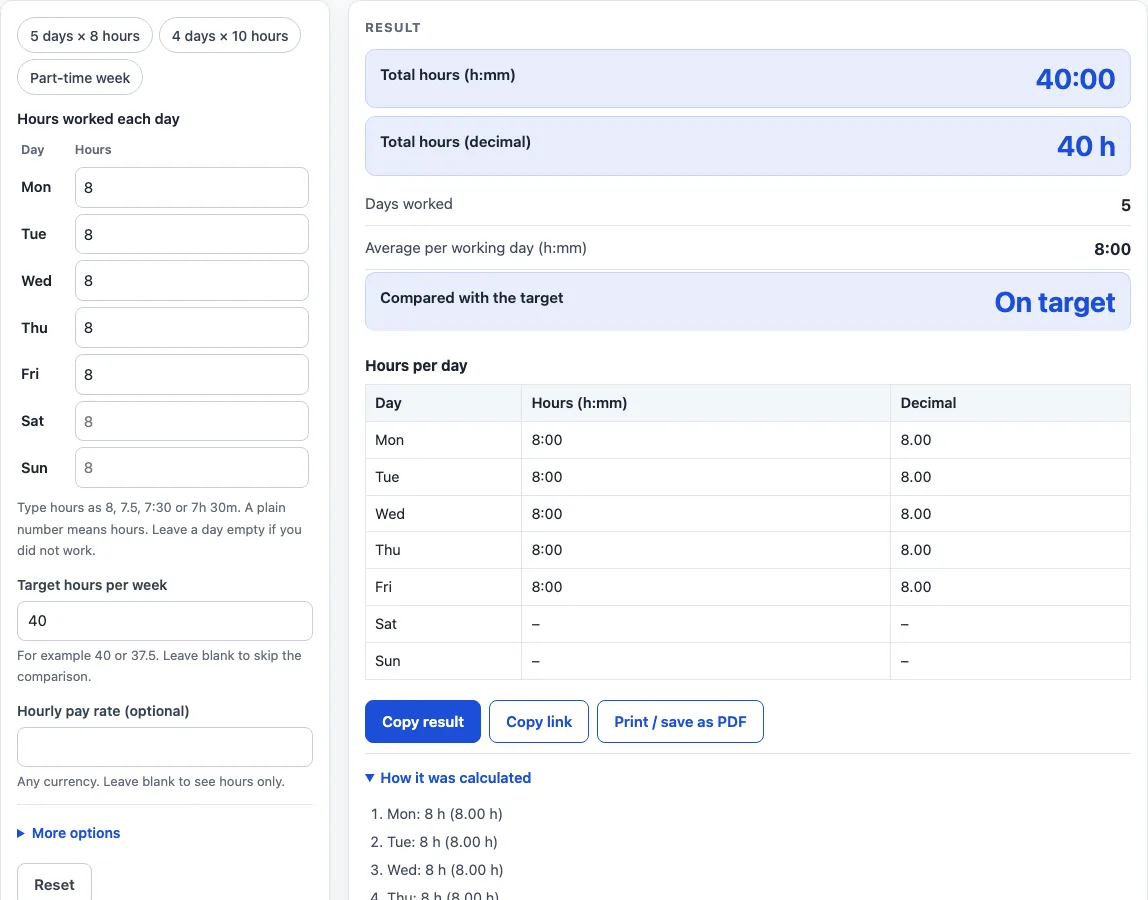
How to use the Weekly Hours Calculator
- In the grid, type the hours for each day, from Monday to Sunday, in the Hours column. You can enter 8, 7.5, 7:30 or 7h 30m. A plain number always means hours.
- Leave a day empty if you did not work it. A day with 0 hours is also not counted as a worked day.
- Check the target hours per week. It starts at 40.
- If you need them, open More options and type an overtime threshold in hours per week, a multiplier (the default is 1.5), and an hourly rate.
- Read the results: total hours as h:mm and decimal, days worked, average per working day, the difference from the target, hours above the threshold, and gross pay. Open How it was calculated to see each step, and check the table to see each day’s hours in both formats.
Three preset buttons above the form load common cases: 5 days × 8 hours, 4 days × 10 hours and Part-time week. Reset restores the starting example. To keep a result, Copy link copies the page address, which stores every input in the ?s= part of the URL, so the same calculation reopens later or can be sent to someone else. Copy result copies the result lines with a link, and Print / save as PDF creates a one-page record with your inputs, results, steps and the date.
How are total hours and the difference from target calculated?
The total is the sum of the hours entered for each day, and the difference is that total minus your target. The result shows the difference as h:mm “over” or “under” the target, or “On target” when they are equal. For example, 27:15 against a 30-hour target is 2:45 under.
How is the average per working day calculated?
The average is the total hours divided by the number of days with hours entered. Days left empty and days with 0 hours are not included in that count. In the example of 4, 5:30, 3h 15m, empty, 6.5 and 8 hours, the total is 27.25 hours across 5 days, so the average is 5.45 hours, shown as 5:27.
How are overtime hours and gross pay worked out?
Overtime hours are the total minus the threshold, if the result is positive. Gross pay is the regular hours times your rate, plus the overtime hours times your rate times the multiplier. Without a threshold, gross pay is the total hours times the rate. For a 48-hour week with a 40-hour threshold, a rate of 20 and a multiplier of 1.5, the overtime is 8 hours and the gross pay is (40 × 20) + (8 × 20 × 1.5) = 1,040.00. Pay here is before any deduction.
The U.S. Department of Labor describes overtime under the Fair Labor Standards Act as at least 1.5 times the regular rate for hours over 40 in a workweek, for covered, non-exempt employees. This calculator uses that formula only as an example. Every threshold and multiplier is a value you type.
How do I use the target?
The target hours per week default to 40, and the result says how far over or under it you are. Change it to your own weekly hours, such as 37.5 or 45. The target is only a comparison number: it does not change the total, and the overtime threshold is a separate setting.
Worked examples
| Input | Result |
|---|---|
| 5 working day(s) | 40:00 (40.00 h), On target |
| 4 working day(s) | 40:00 (40.00 h), On target |
| 5 working day(s) | 27:15 (27.25 h), 2:45 under, gross pay 449.63 |
| 6 working day(s) | 48:00 (48.00 h), 8:00 over, gross pay 1,040.00 |
Calculated by the tool above; open it with the same values to see each step.
Frequently asked questions
How do I enter 7.5 hours or 7 hours 30 minutes?
Type 7.5, 7:30 or 7h 30m in the day’s box. Each format gives the same total of 7.5 hours.
What happens if I leave a day empty or enter 0?
Both are treated as not worked. They do not count toward days worked or the average per working day.
Why does a warning or error appear?
A warning appears if a day is over 24 hours. An error appears for an unreadable or negative entry, an empty week, or a multiplier under 1. Fix the entry and the result updates.
Can I use it for a 45 hour work week?
Yes. Change the target hours per week to 45. If you also want overtime figures, set the overtime threshold to 45 as well.
Can I calculate two weeks at once?
This calculator works on one week at a time. For a two-week pay period, enter each week separately or use the Biweekly Timesheet Calculator.
Does the default 40 hours mean a legal limit?
No. The 40 is only the starting value for the target. You can change it to match your job or contract.
Is the weekly hours calculator free, and is anything I type uploaded?
Yes, it is free and needs no account or sign-up. Everything is calculated in your browser, and nothing you type is uploaded.
Is this tax or payroll advice?
No. Results are plain arithmetic on the numbers you enter, before any deduction. They are not legal, tax or payroll advice, and rules differ by country, state and contract.
Related tools
- Time Card Calculator: total a week of clock-in and clock-out times, with breaks, rounding, overtime and pay.
- Work Hours Calculator: hours worked in one shift, then per week, month and year.
- Timesheet Calculator: add up any number of shifts pasted one per line.
- Biweekly Timesheet Calculator: a two-week time card with overtime counted per week.
- Time Clock Calculator: punches before and after lunch for each day of the week.
- Clock Out Time Calculator: find the time you can clock out.
- Printable Timesheet: print a blank weekly, biweekly, semi-monthly or monthly timesheet.
- Shift Hours Calculator: end time and paid hours for 8, 10 and 12 hour shifts.
- Time Clock Rounding Calculator: round punches to 5, 6, 10, 15, 30 or 60 minutes and see the effect.